
The NAT section is used to configure Network Address Translation settings for SIP and media communication. These settings help ensure that SIP signaling and RTP audio traffic are routed correctly when the PBX system is operating behind a router.
In Telsip Cloud PBX deployments, NAT is enabled by default. The system can automatically detect the public IP address and the local network of the machine, reducing the need for manual NAT configuration in most standard cloud installations.
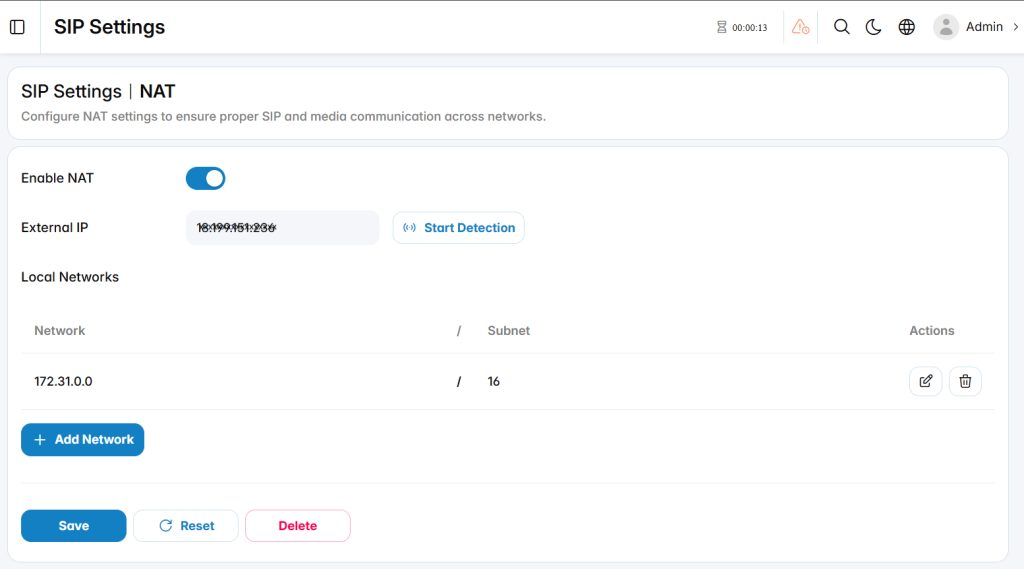
NAT Configuration
The NAT configuration defines how the PBX identifies its public address and local networks during SIP communication.
Enable NAT: Enables NAT handling for SIP and media traffic.
External IP: Defines the public IP address used by external SIP endpoints and providers to reach the PBX.
Start Detection: Attempts to detect the external IP address automatically.
Local Networks
The Local Networks area defines the private network ranges that should be treated as internal networks by the PBX. These entries help the system determine whether SIP endpoints are located inside the local network or connecting from an external network.