• Telsip Onboarding
    • Registering a New Company on Telsip
    • Logging in to Your Company Account
    • Subscribing to Telsip Plans
    • Payment & Activation
  • Telsip Business Portal
    • Dashboard
    • Spark Management
    • DID Numbers
    • Billing & Payments
      • Subscriptions
      • Wallet
      • Orders
      • Payment History
      • Payment Cards
    • الشركة
    • الدعم
    • Settings
    • User Profile
  • Telsip Mobile Application
    • Application Login
    • Phone
    • Calls
    • Connections
    • Voicemail
    • More Menu
      • Accounts
      • Settings
      • Change Language
      • About App
      • Call Telsip Support
      • Chat with Telsip Support
  • Telsip Platform
    • Telsip Cloud PBX
      • PBX V 1.X.X
        • Overview
          • Log in to the PBX
        • System
          • Authentication
            • Users
            • Groups
            • Permissions
          • Network
            • Network Host
            • Diagnostic Tools
          • Email
          • Security
            • IP Tables
            • Fail2ban
          • VPN
          • Maintenance
          • LDAP
        • PBX
          • Extensions
          • Trunks
          • Call controls
            • Inbound Routes
            • Outbound Routes
            • Time Conditions
            • Auto CLIP
          • Call Features
            • IVR
            • Ring Group
            • Queue
            • Paging/Intercom
            • Blacklist
          • Voice Prompts
          • Music On Hold
          • NAT
          • Status
          • CDR
          • Feature Code
          • Recording Storage
          • Transport
        • Event Center
          • Session Timeout
          • Activity Log
      • PBX V 2.X.X
        • Overview
        • Transitional Version
          • Old Design
          • New Design
      • PBX V 3.X.X
        • Overview
          • Log in to the PBX
          • License
        • Dashboard
        • Extensions
          • Extension Logs
        • Trunks
        • Queues
        • PBX Features
          • Call Features
            • IVR
            • Ring Group
            • Paging/Intercom
            • Blacklist
          • Call controls
            • Inbound Routes
            • Outbound Routes
            • Time Conditions
            • Auto CLIP
          • Feature Code
        • Voice & Audio
          • Voice Prompts
          • Music On Hold
          • System Sound Language
        • SIP Settings
          • NAT
          • Transport
          • Media Transport Settings
        • System
          • Network
            • Network Routes
            • Network Host
            • Diagnostic Tools
          • VPN
          • SMTP Settings
          • LDAP
          • Session Timeout
          • Storage
        • Security
          • Firewall
          • Fail2ban
        • Maintenance
          • Service Actions
          • Backup & Restore
        • Authentication
          • Users
          • Groups
          • Permissions
        • Advanced Settings
        • CDRs
        • Status
        • Audit Log
    • Telsip Cloud Call Center
      • Call Center V 1.X.X
        • Overview
          • Log in to the call center
        • Dashboard
          • Agent Insights
          • Inbound calls
          • Outbound calls
          • My Dashboard
        • Call Center Management
          • Missed Call Actions
            • Missed Calls Actions History
            • Missed Call Actions
            • Missed Calls Actions Logs
          • Type of Break
          • Widgets
          • CDRs
          • CDR Survey Questions
          • Queues
          • Queue Logs
          • Trunk
          • External Lookup
        • Contacts Management
          • Contacts
          • Contact Groups
          • Companies
          • Contact Custom fields
          • Customer Journey
        • Authentication
          • Users
            • Admin
            • Supervisor
            • Agent
          • Groups
          • Permissions
          • Add End User
        • Applications
          • Ticket Managements
            • Create Ticket
            • Categories
              • Sub Categories
            • Reminder Settings
            • Tickets List
            • Ticket Statistics
            • Tickets CCs
            • Follow Up
            • Notifications Templates
            • Custom Fields
            • Ticket Logs
          • SMS
            • SMS Message
            • Bulk SMS
            • SMS Templates
          • Email Management
            • Outgoing Emails
            • Incoming Emails
            • Attachments
            • Templates
            • Teams
          • Auto Dialer
            • Dial Teams
            • Auto Dialer Log
            • Auto Dialer Status
          • Web Chat
            • Dashboard
            • Offline Messages
            • Web Chat Logs
          • Queue Evaluation
            • Queues Evaluation Level
            • Queues Evaluation
          • Social Media
            • Social Media Teams
            • Social Media Sessions Tracker
            • WhatsApp
          • Agent Chat
        • Reports
          • Generate Reports
        • Settings
          • Site Administration
          • Email Settings
          • Email Channel Mailbox
          • Email Channel Outbox
          • Email Logger
          • Web Chat Settings
          • SMS Gateway
          • ODBC Settings
          • System Parameters
          • Updates
          • Web Phone Configuration
          • Web Logo Settings
          • End User Logo
        • Block
          • Blocked Word
          • Block Settings
        • Status
        • Session Control
        • Activity Log
      • Call Center V 2.X.X
        • Overview
        • Transitional Version
          • Old Design
          • New Design
      • Call Center V 3.X.X
        • Overview
          • Login to Call Center
          • License
        • Dashboard
          • Inbound Calls Dashboard
          • Outbound Calls Dashboard
          • My Dashboard
          • Agent Analytics Dashboard
        • Call Center Tools
          • Agent Status Logs
          • Call Tags
          • Missed Call Management
          • Custom Widgets
          • Type Of Break
          • External Lookup
        • Contacts
          • Contacts Dashboard
          • All Contacts
          • Contact Groups
          • Contact Tags
          • Companies
          • Custom Fields
          • Customer Journey
        • Applications
          • Tickets
            • Dashboard
            • All Tickets
            • Categories
              • Subcategories
            • Ticket CC
            • Reminder Settings
            • Ticket Follow Up
            • Ticket Custom Fields
            • Notification Templates
            • Ticket Log
          • SMS
            • Dashboard
            • SMS Messages
            • Bulk SMS
            • SMS Templates
            • SMS Settings
          • قنوات البريد الإلكتروني
            • Dashboard
            • Outgoing Emails
            • Incoming Emails
            • Attachments
            • Email Templates
            • Teams
            • Mailbox Settings
            • Outbox Settings
          • Web Chat
            • Dashboard
            • Offline Messages
            • Web Chat Logs
            • Web Chat Settings
          • Block
            • Blocked Words
            • Block Settings
            • Block List
          • Auto Dialer
            • Auto Dialer
            • Dial Teams
            • Auto Dialer Log
            • Auto Dialer Status
          • Queue Evaluation
            • Evaluation Level
            • Queue Evaluation
          • Agent Chat
        • Settings
          • Site Administration
          • Email Settings
          • Email Logger
          • ODBC Settings
          • System Parameters
          • Web Logo Settings
          • End User Logo
        • Authentication
          • Users
            • Agent
            • Supervisor
          • End User
        • Live Status
        • Reports
        • Session Control
    • Versions & Releases
      • v1.x.x
        • v1.1.x
        • v1.2.x
        • v1.3.x
        • v1.4.x
        • v1.5.x
        • v1.6.x
        • v1.7.x
        • v1.8.x
        • v1.9.x
        • v1.10.x
        • v1.11x
      • v2.x.x
        • v2.0.X
          • v2.0.4
      • v3.x.x
        • v3.0.x
        • v3.1.x
        • v3.2.x
        • v3.3.x

Registering a New Company on Telsip

99 views 0

Written by Telsip WikiAdmin
أغسطس 13, 2025

To access Telsip services and subscribe to any plan, you must first create a company account. Follow the steps below to complete the registration process:

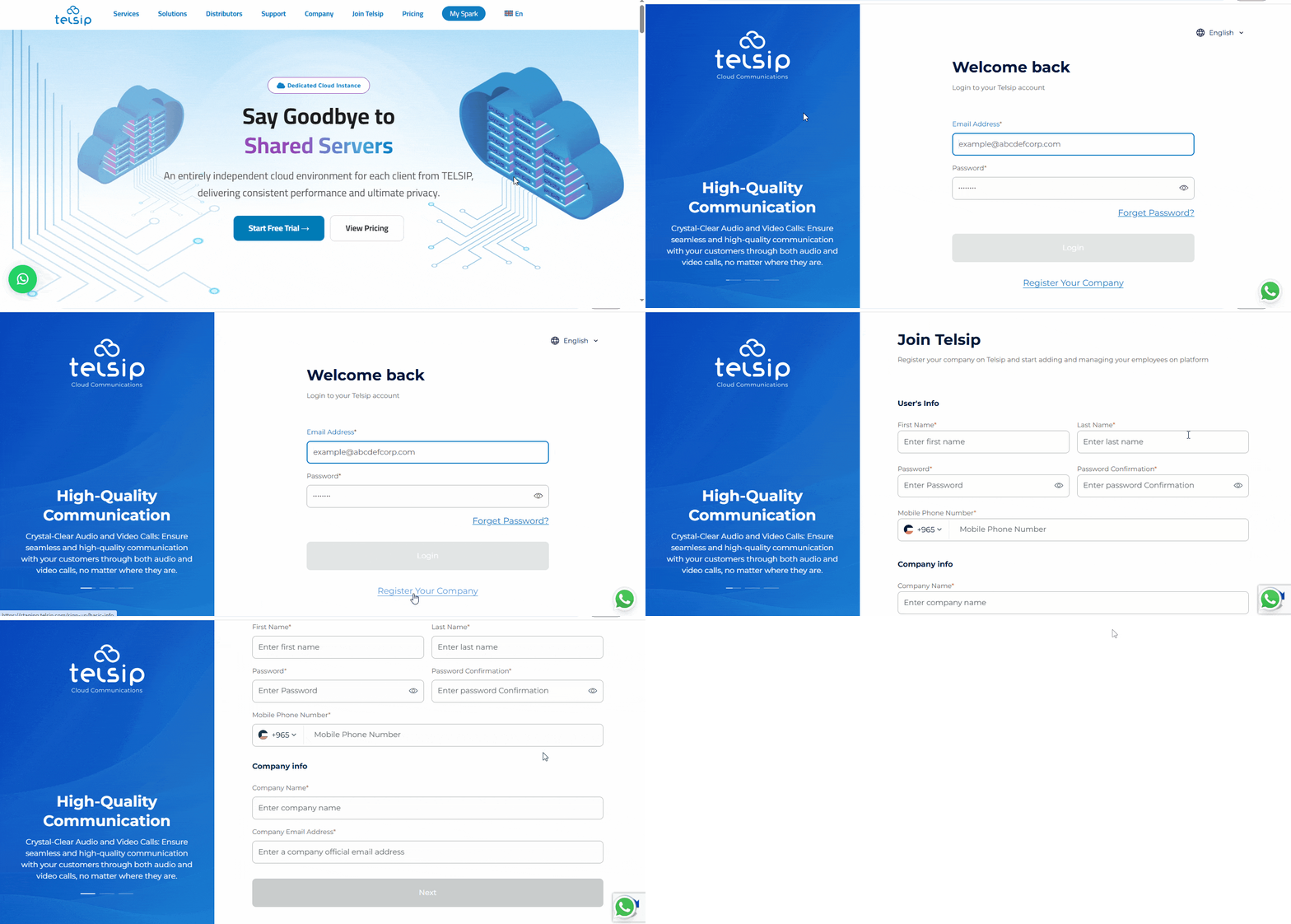
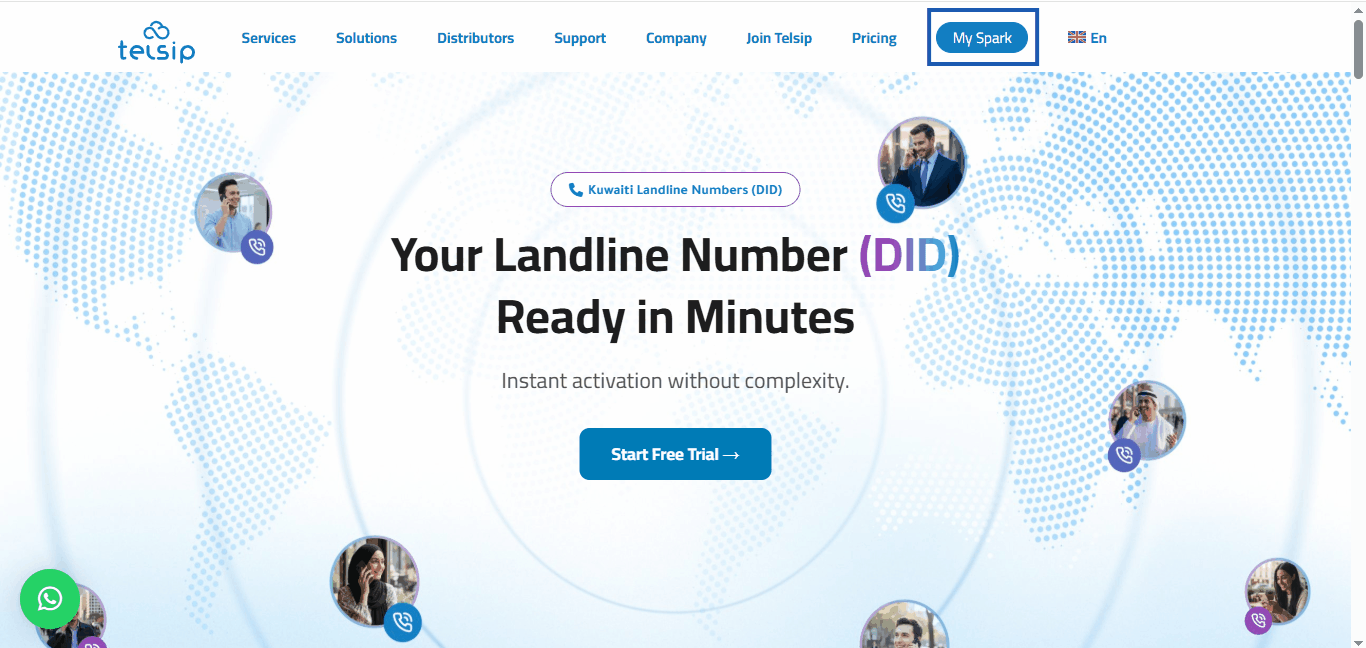
  • Go to Telsip website.
  • Click on My Spark to open the login page.
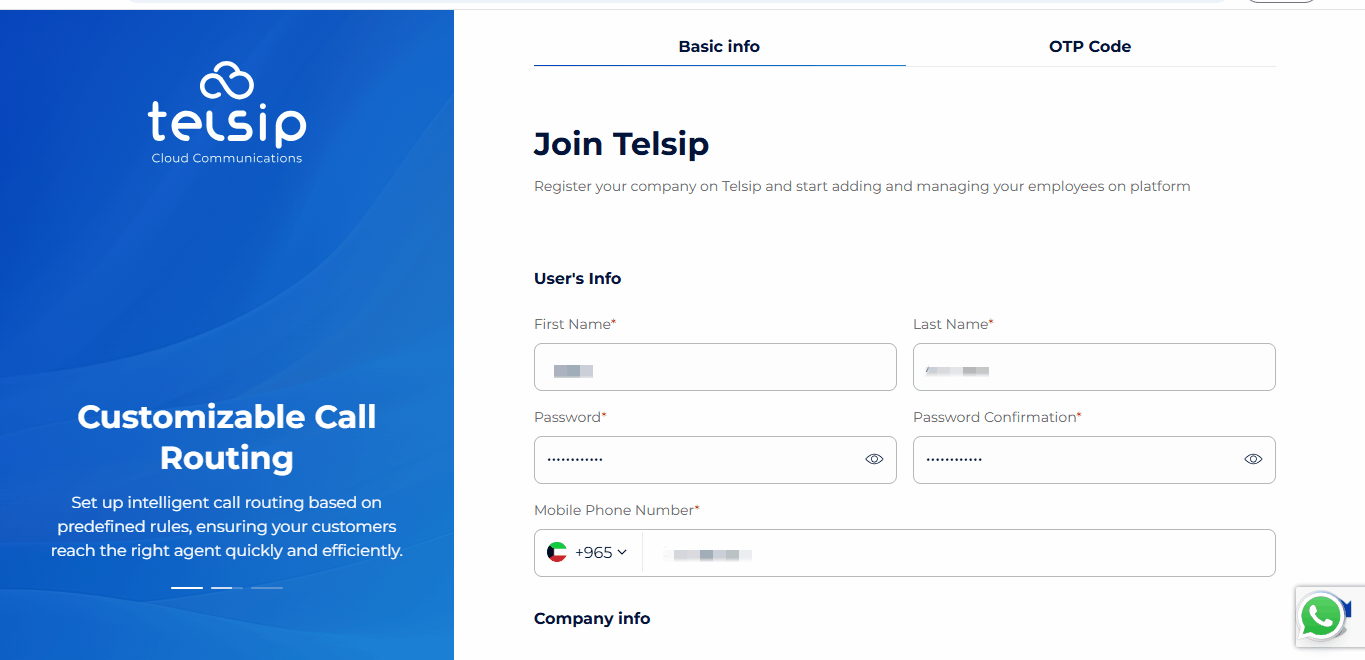
  • Select Register your company.
  • Fill in the required details:
    • Full name
    • Password for the company account
    • Email address
    • Company name
    • Mobile number

📌 Note: The Full Name (first and last name) and Company Name can be entered in either Arabic or English.
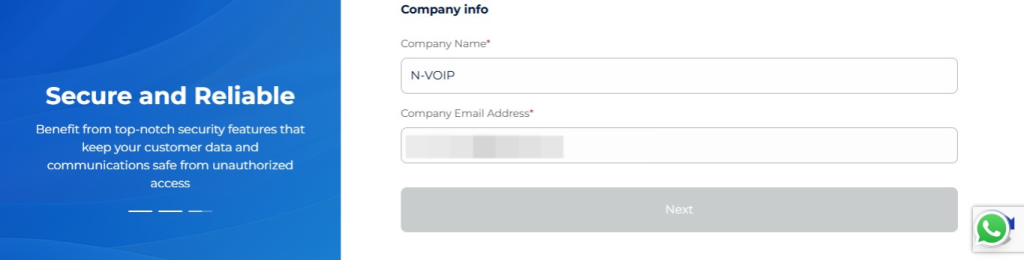
  • After entering your company information, you will need to verify your mobile number using a One-Time Password (OTP).
  • Choose how you would like to receive the OTP: via SMS or WhatsApp.
  • Enter the OTP to verify your mobile number and continue the registration process.
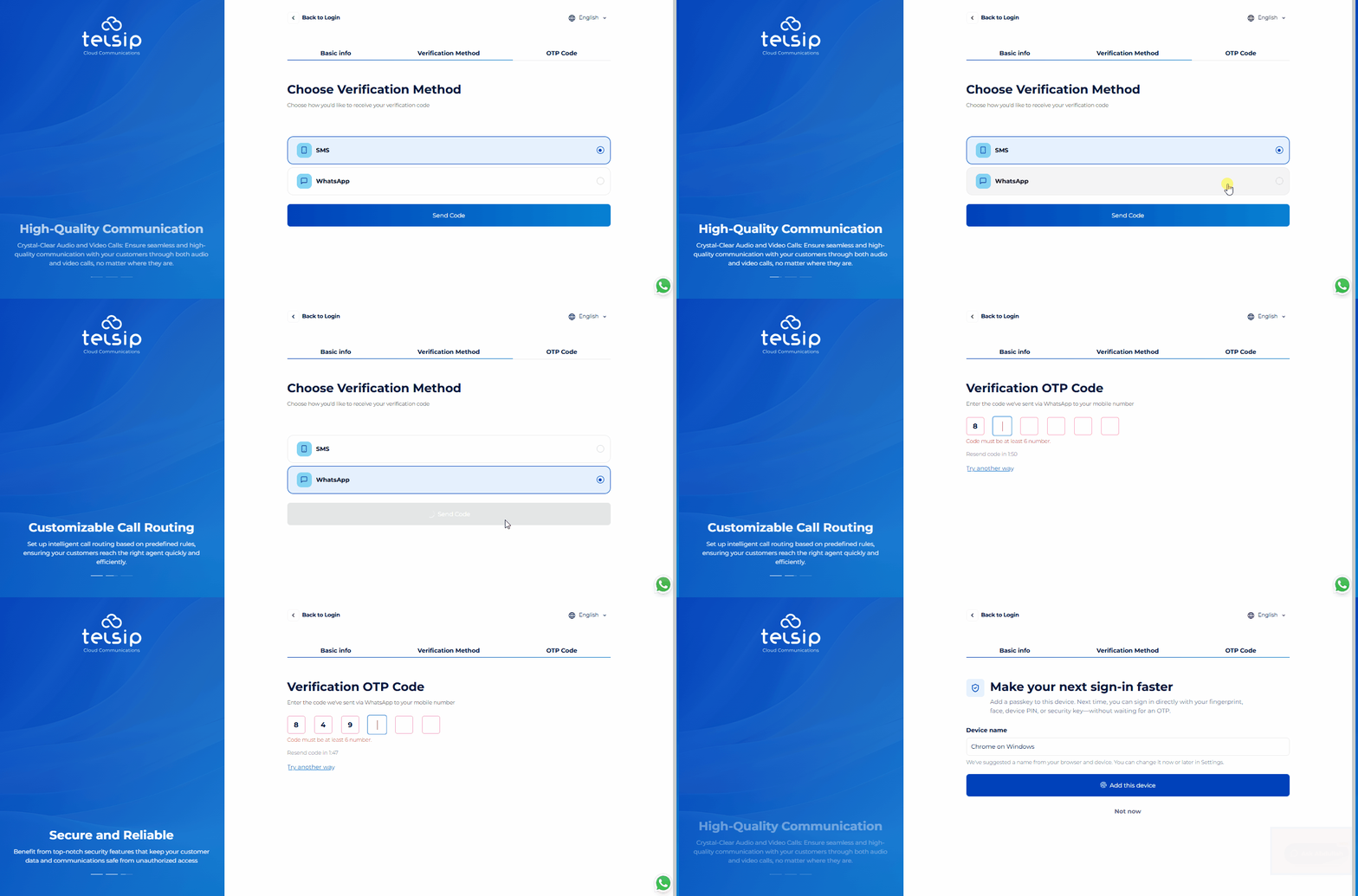
  • After verifying your mobile number with the OTP, you will see an optional Passkey setup for faster and more convenient future sign-ins.
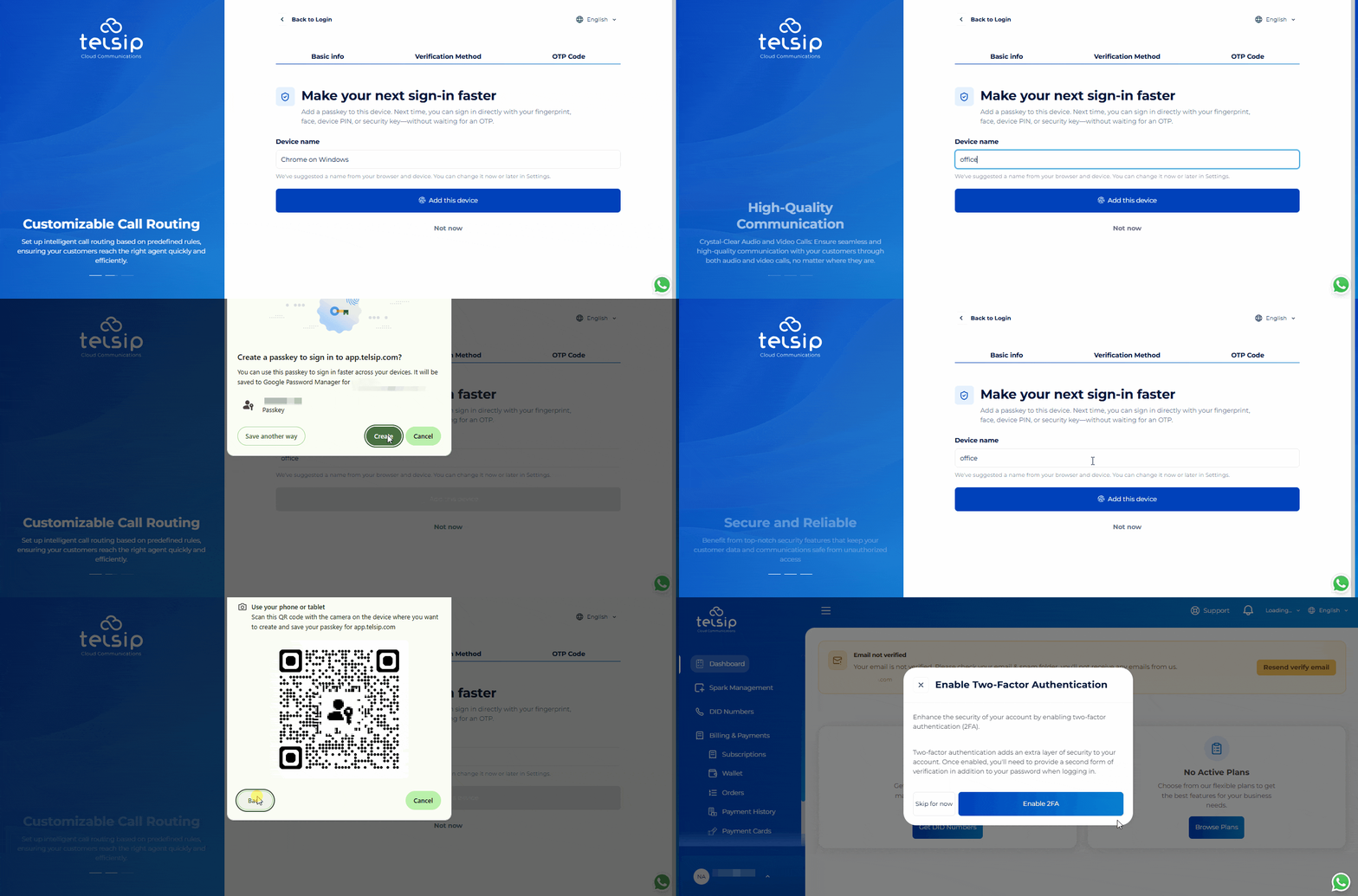
  • You can give each Passkey a device name so you can easily identify which device it belongs to. You can then save the Passkey using one of the available methods:
    • Password Manager: Save the Passkey using the password manager supported by your browser, such as Google Password Manager.
    • Phone or Tablet: Scan the displayed QR code using your phone or tablet, then confirm using the device’s available screen lock method, such as fingerprint, face recognition, PIN, pattern, or password.
    • External Security Key: Save the Passkey on a compatible external security key, such as a USB security key.

📌Notes:

  • Setting up a Passkey is optional. You can select “Not now” to skip this step and continue. You can also return later and set up a Passkey at any time from the Settings section in your company account.
  • The Password Manager / PIN option is only available when your browser has an active user profile or password manager session that supports saving Passkeys. If you are using Guest mode or browsing without signing in to a supported browser profile, this option may not appear because no active password manager profile is available to store the Passkey.
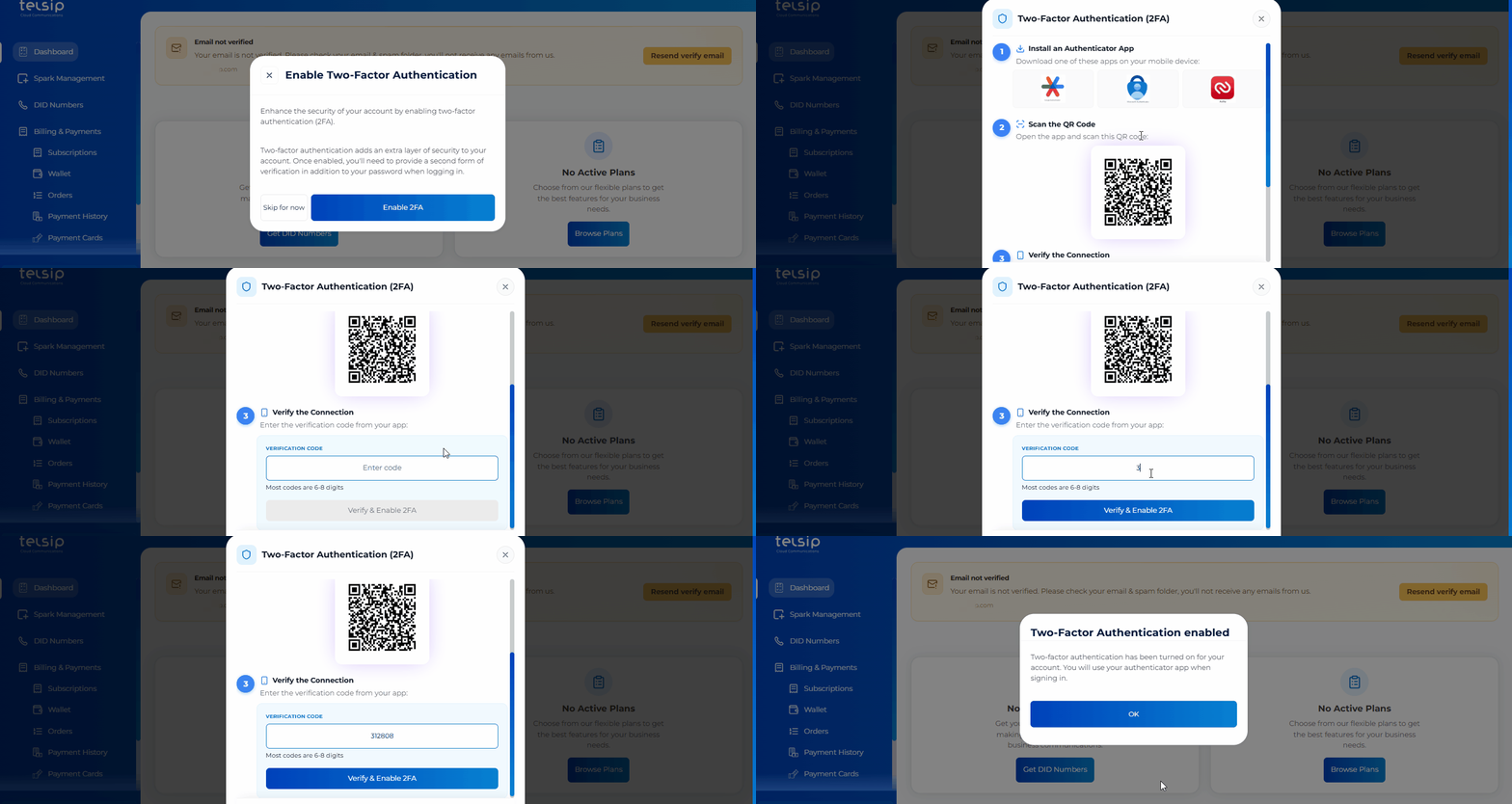
  • After completing or skipping the Passkey setup and logging in to your account, you will see an option to enable Two-Factor Authentication (2FA) for additional security.
  • We highly recommend enabling 2FA using an authenticator app such as Google Authenticator.
  • During setup, the system will show you a QR code and a setup key. Scan the QR code or enter the setup key in your authenticator app to add your Telsip account.
  • Enter the OTP generated by the authenticator app to complete the activation.
  • Once 2FA is enabled, a new verification code from the authenticator app will be required every time you log in.

📌 Note: When 2FA is enabled, verification codes will no longer be sent via SMS or WhatsApp to your registered mobile number.
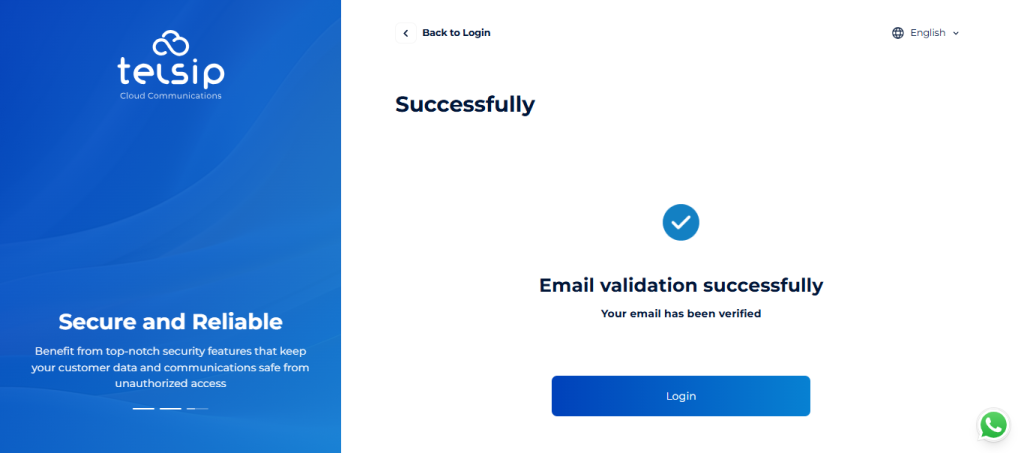
  • Next, you will be asked to verify your email address:
    • Check your inbox for the verification email.
    • Click the verification link to confirm your email, which will redirect you to the Telsip User Portal, confirming that your email has been successfully verified.
  • Once all these steps are completed, your company account will be ready, and you can start subscribing to our services.

Was this helpful?

Yes  No

Didn't find your answer? تواصل معنا

Previously
Telsip Onboarding
Up Next
Logging in to Your Company Account
©2026 XonTel Technology Co. W.L.L. – Kuwait. All rights reserved.
TELSIP is a Registered Trademark of XonTel Technologies, registered with EUIPO.