• Telsip Onboarding
    • Registering a New Company on Telsip
    • Logging in to Your Company Account
    • Subscribing to Telsip Plans
    • Payment & Activation
  • Telsip Business Portal
    • Dashboard
    • Spark Management
    • DID Numbers
    • Billing & Payments
      • Subscriptions
      • Wallet
      • Orders
      • Payment History
      • Payment Cards
    • الشركة
    • الدعم
    • Settings
    • User Profile
  • Telsip Mobile Application
    • Application Login
    • Phone
    • Calls
    • Connections
    • Voicemail
    • More Menu
      • Accounts
      • Settings
      • Change Language
      • About App
      • Call Telsip Support
      • Chat with Telsip Support
  • Telsip Platform
    • Telsip Cloud PBX
      • PBX V 1.X.X
        • Overview
          • Log in to the PBX
        • System
          • Authentication
            • Users
            • Groups
            • Permissions
          • Network
            • Network Host
            • Diagnostic Tools
          • Email
          • Security
            • IP Tables
            • Fail2ban
          • VPN
          • Maintenance
          • LDAP
        • PBX
          • Extensions
          • Trunks
          • Call controls
            • Inbound Routes
            • Outbound Routes
            • Time Conditions
            • Auto CLIP
          • Call Features
            • IVR
            • Ring Group
            • Queue
            • Paging/Intercom
            • Blacklist
          • Voice Prompts
          • Music On Hold
          • NAT
          • Status
          • CDR
          • Feature Code
          • Recording Storage
          • Transport
        • Event Center
          • Session Timeout
          • Activity Log
      • PBX V 2.X.X
        • Overview
        • Transitional Version
          • Old Design
          • New Design
      • PBX V 3.X.X
        • Overview
          • Log in to the PBX
          • License
        • Dashboard
        • Extensions
          • Extension Logs
        • Trunks
        • Queues
        • PBX Features
          • Call Features
            • IVR
            • Ring Group
            • Paging/Intercom
            • Blacklist
          • Call controls
            • Inbound Routes
            • Outbound Routes
            • Time Conditions
            • Auto CLIP
          • Feature Code
        • Voice & Audio
          • Voice Prompts
          • Music On Hold
          • System Sound Language
        • SIP Settings
          • NAT
          • Transport
          • Media Transport Settings
        • System
          • Network
            • Network Routes
            • Network Host
            • Diagnostic Tools
          • VPN
          • SMTP Settings
          • LDAP
          • Session Timeout
          • Storage
        • Security
          • Firewall
          • Fail2ban
        • Maintenance
          • Service Actions
          • Backup & Restore
        • Authentication
          • Users
          • Groups
          • Permissions
        • Advanced Settings
        • CDRs
        • Status
        • Audit Log
    • Telsip Cloud Call Center
      • Call Center V 1.X.X
        • Overview
          • Log in to the call center
        • Dashboard
          • Agent Insights
          • Inbound calls
          • Outbound calls
          • My Dashboard
        • Call Center Management
          • Missed Call Actions
            • Missed Calls Actions History
            • Missed Call Actions
            • Missed Calls Actions Logs
          • Type of Break
          • Widgets
          • CDRs
          • CDR Survey Questions
          • Queues
          • Queue Logs
          • Trunk
          • External Lookup
        • Contacts Management
          • Contacts
          • Contact Groups
          • Companies
          • Contact Custom fields
          • Customer Journey
        • Authentication
          • Users
            • Admin
            • Supervisor
            • Agent
          • Groups
          • Permissions
          • Add End User
        • Applications
          • Ticket Managements
            • Create Ticket
            • Categories
              • Sub Categories
            • Reminder Settings
            • Tickets List
            • Ticket Statistics
            • Tickets CCs
            • Follow Up
            • Notifications Templates
            • Custom Fields
            • Ticket Logs
          • SMS
            • SMS Message
            • Bulk SMS
            • SMS Templates
          • Email Management
            • Outgoing Emails
            • Incoming Emails
            • Attachments
            • Templates
            • Teams
          • Auto Dialer
            • Dial Teams
            • Auto Dialer Log
            • Auto Dialer Status
          • Web Chat
            • Dashboard
            • Offline Messages
            • Web Chat Logs
          • Queue Evaluation
            • Queues Evaluation Level
            • Queues Evaluation
          • Social Media
            • Social Media Teams
            • Social Media Sessions Tracker
            • WhatsApp
          • Agent Chat
        • Reports
          • Generate Reports
        • Settings
          • Site Administration
          • Email Settings
          • Email Channel Mailbox
          • Email Channel Outbox
          • Email Logger
          • Web Chat Settings
          • SMS Gateway
          • ODBC Settings
          • System Parameters
          • Updates
          • Web Phone Configuration
          • Web Logo Settings
          • End User Logo
        • Block
          • Blocked Word
          • Block Settings
        • Status
        • Session Control
        • Activity Log
      • Call Center V 2.X.X
        • Overview
        • Transitional Version
          • Old Design
          • New Design
      • Call Center V 3.X.X
        • Overview
          • Login to Call Center
          • License
        • Dashboard
          • Inbound Calls Dashboard
          • Outbound Calls Dashboard
          • My Dashboard
          • Agent Analytics Dashboard
        • Call Center Tools
          • Agent Status Logs
          • Call Tags
          • Missed Call Management
          • Custom Widgets
          • Type Of Break
          • External Lookup
        • Contacts
          • Contacts Dashboard
          • All Contacts
          • Contact Groups
          • Contact Tags
          • Companies
          • Custom Fields
          • Customer Journey
        • Applications
          • Tickets
            • Dashboard
            • All Tickets
            • Categories
              • Subcategories
            • Ticket CC
            • Reminder Settings
            • Ticket Follow Up
            • Ticket Custom Fields
            • Notification Templates
            • Ticket Log
          • SMS
            • Dashboard
            • SMS Messages
            • Bulk SMS
            • SMS Templates
            • SMS Settings
          • قنوات البريد الإلكتروني
            • Dashboard
            • Outgoing Emails
            • Incoming Emails
            • Attachments
            • Email Templates
            • Teams
            • Mailbox Settings
            • Outbox Settings
          • Web Chat
            • Dashboard
            • Offline Messages
            • Web Chat Logs
            • Web Chat Settings
          • Block
            • Blocked Words
            • Block Settings
            • Block List
          • Auto Dialer
            • Auto Dialer
            • Dial Teams
            • Auto Dialer Log
            • Auto Dialer Status
          • Queue Evaluation
            • Evaluation Level
            • Queue Evaluation
          • Agent Chat
        • Settings
          • Site Administration
          • Email Settings
          • Email Logger
          • ODBC Settings
          • System Parameters
          • Web Logo Settings
          • End User Logo
        • Authentication
          • Users
            • Agent
            • Supervisor
          • End User
        • Live Status
        • Reports
        • Session Control
    • Versions & Releases
      • v1.x.x
        • v1.1.x
        • v1.2.x
        • v1.3.x
        • v1.4.x
        • v1.5.x
        • v1.6.x
        • v1.7.x
        • v1.8.x
        • v1.9.x
        • v1.10.x
        • v1.11x
      • v2.x.x
        • v2.0.X
          • v2.0.4
      • v3.x.x
        • v3.0.x
        • v3.1.x
        • v3.2.x
        • v3.3.x

Log in to the PBX

46 views 0

Written by Telsip WikiAdmin
يوليو 30, 2026

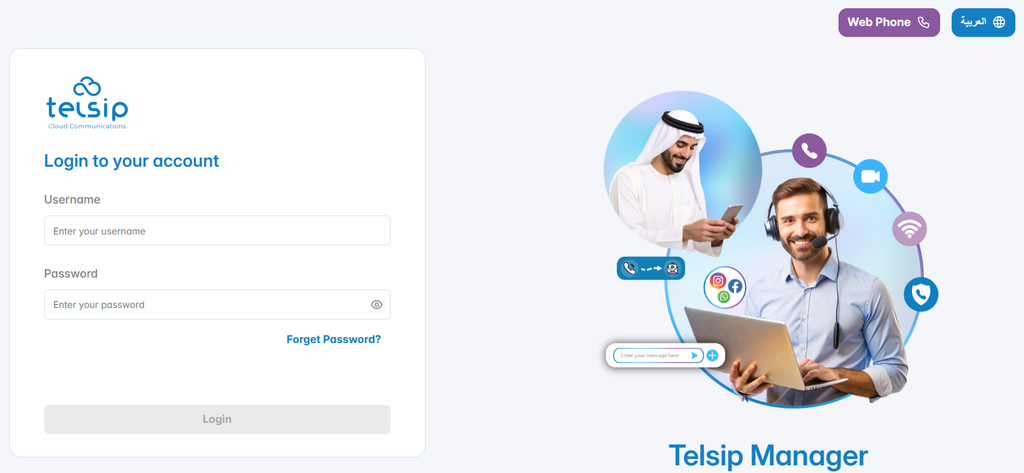
The Login section is used to access the Telsip PBX management interface. Administrators must use the PBX domain and the account credentials provided after purchasing or activating the server.

Login Steps

1. Open the PBX Domain

Open a web browser and navigate to the PBX domain provided for the server.

This domain opens the Telsip Manager login screen, where the administrator can access the PBX management interface.

Enter Administrator Credentials

On the login screen, enter the administrator account details.

  • Username: Enter admin.
  • Password: Enter the password that was changed by the client from the email received after purchasing the server.

After entering the credentials, click Login to continue.
2. Complete CAPTCHA Verification

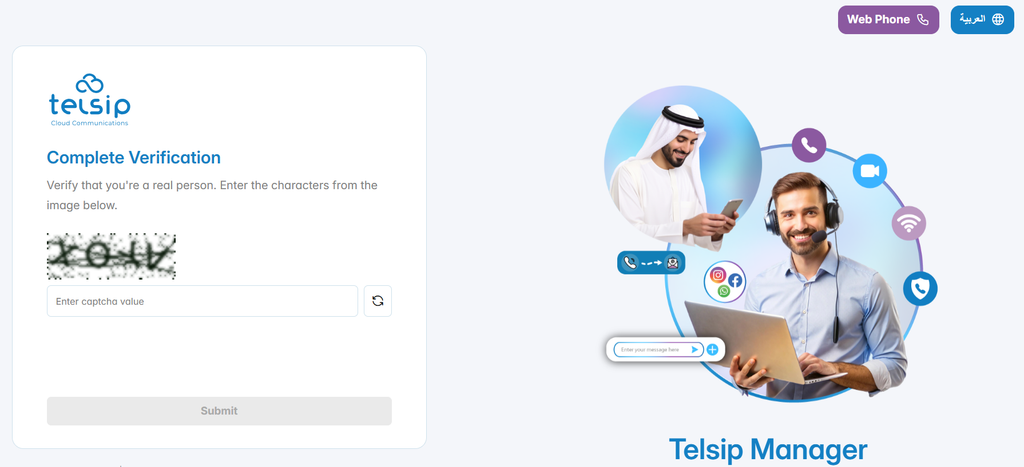
If CAPTCHA is enabled, the system displays a verification challenge after submitting the login credentials.

Enter the characters shown in the CAPTCHA image, then click Submit.

CAPTCHA helps protect the login process from automated access attempts.
3. Enter OTP Code

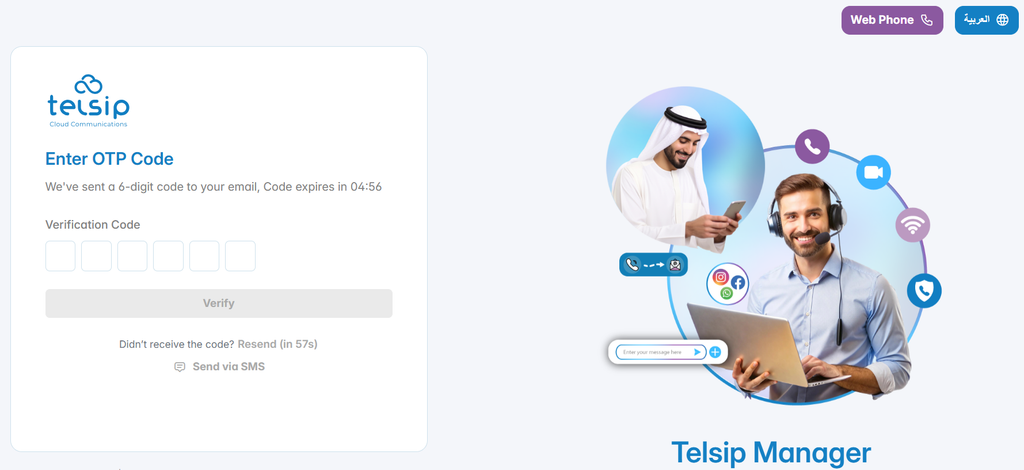
If OTP verification is enabled, the system sends a 6-digit verification code to the registered email address.

Enter the OTP code in the verification fields, then click Verify.

The OTP code is valid for a limited time only. If the code is not received, click Resend after the countdown ends. If SMS delivery is configured, the Send via SMS option may also be available.
Access the PBX Dashboard

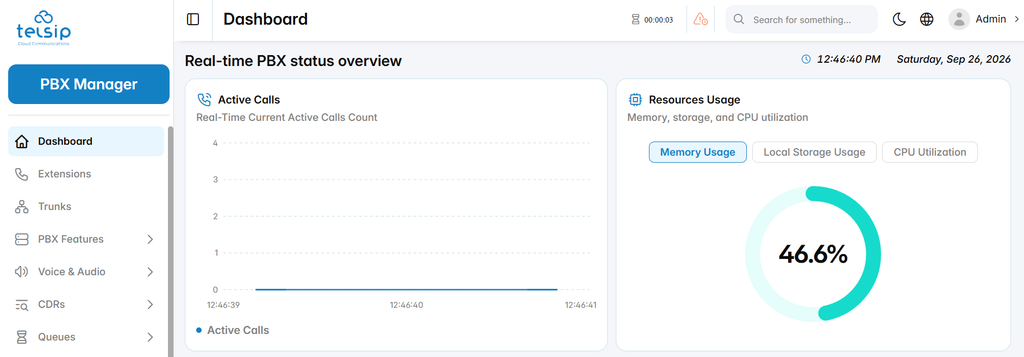
After the login credentials, CAPTCHA, and OTP verification are completed successfully, the administrator is redirected to the Telsip PBX Dashboard.

From the dashboard, the administrator can begin managing extensions, trunks, call routing, users, security settings, and system services.
Managing Account and Personal Preferences

Account Menu

The account menu is available from the top-right corner of the interface. It provides quick access to user-related actions and system configuration options.
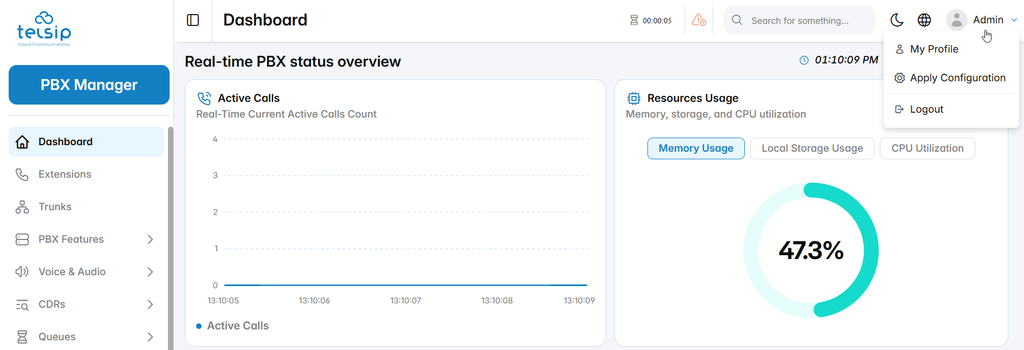
The account menu includes:

  • My Profile: Opens the account profile page, where the user can manage personal information, authentication settings, and password changes.
  • Apply Configuration: Applies pending PBX configuration changes to the running system.
  • Logout: Ends the current user session and returns to the login page.

My Profile

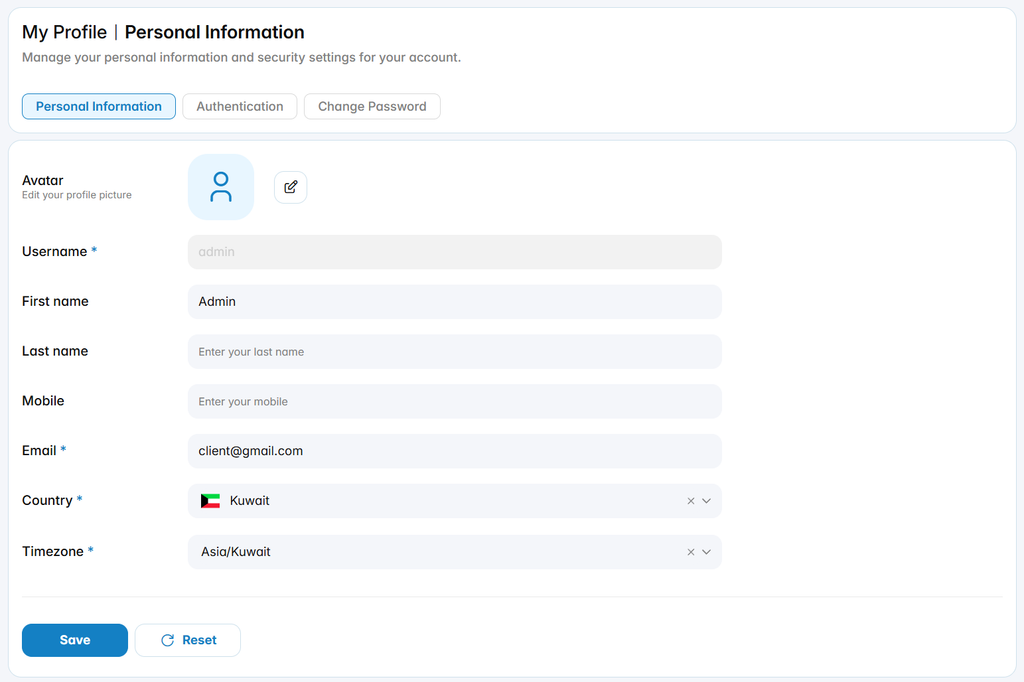
The My Profile section allows the logged-in user to manage personal account information and security settings.

Personal Information

The Personal Information tab allows the user to update profile details, including avatar, first name, last name, mobile number, email address, country, and timezone.
Authentication

The Authentication tab allows the user to manage login security options.
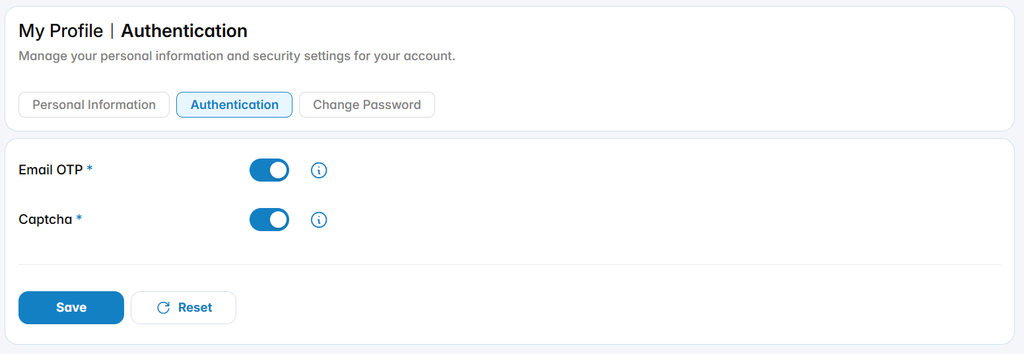
including:

  • Email OTP: Requires a one-time verification code during login.
  • Captcha: Requires CAPTCHA verification to protect the account from automated login attempts.

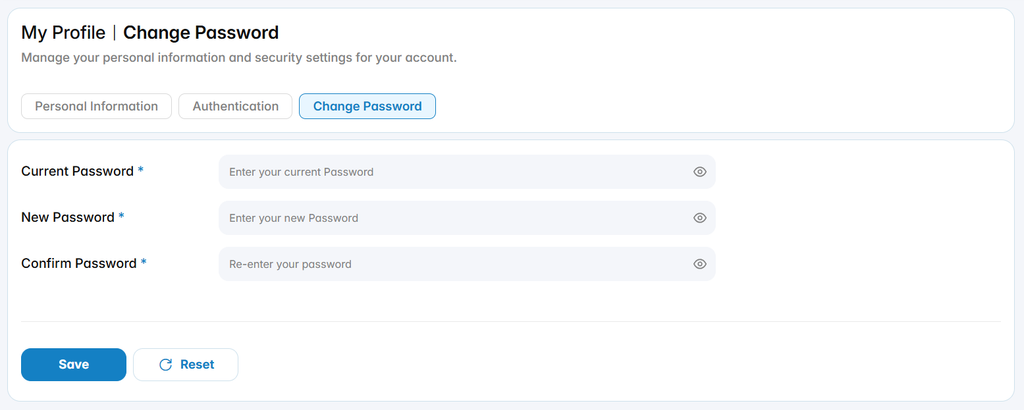
Change Password

The Change Password tab allows the user to update the account password by entering the current password, the new password, and password confirmation.
Forget Password

The Forgot Password process allows users to reset their account password when they cannot access the system using their current login credentials. The reset process verifies the user’s email address and allows a new password to be created securely.

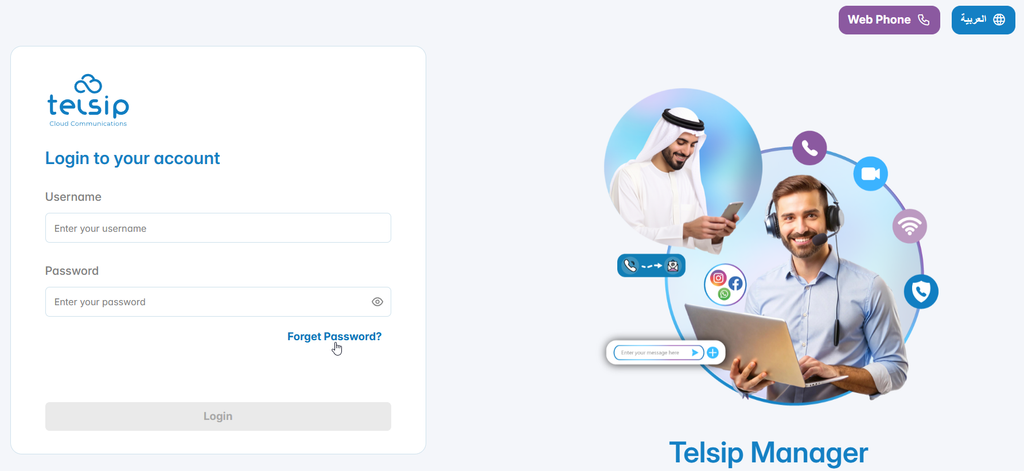
1. Open the Login Page

Go to the Telsip Manager login page.

On the login form, click Forgot Password? under the password field.
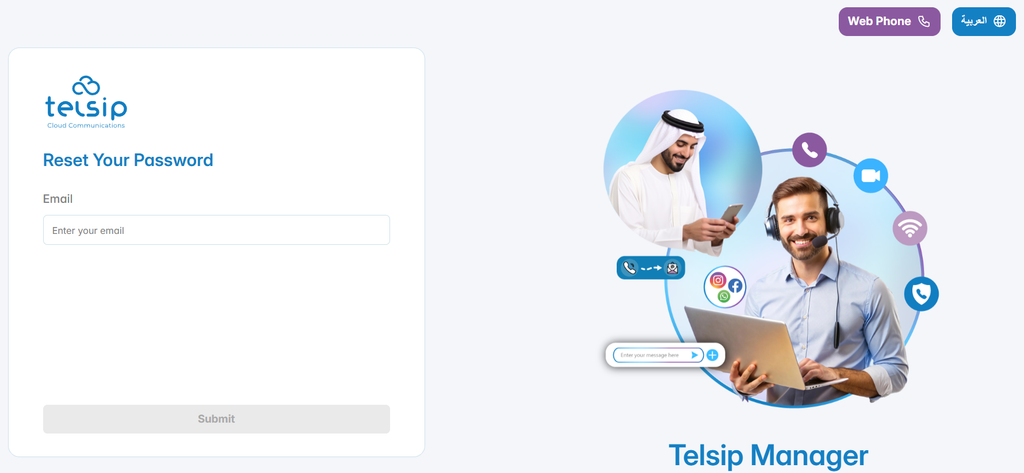
2. Enter Email Address

Enter the email address linked to the user account, then click Submit.
3. Verify the Reset Request

After submitting the email address, the system verifies whether the email exists and is associated with an active user account.

If the email is valid, the system sends a reset link to the registered email address.
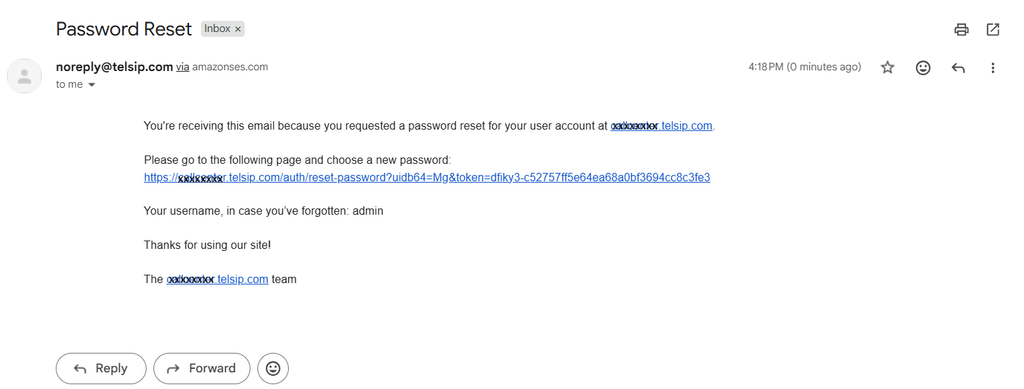
  • You will receive an email titled “Password Reset” from the system.
  • The email includes:
    • A password reset link
    • Your username (in case you forgot it)
    • The system address where the request was made

Note: If the email doesn’t appear in your inbox, check your spam/junk folder.

4. Create a New Password

Open the password reset link or continue from the verification step, then enter the new password.
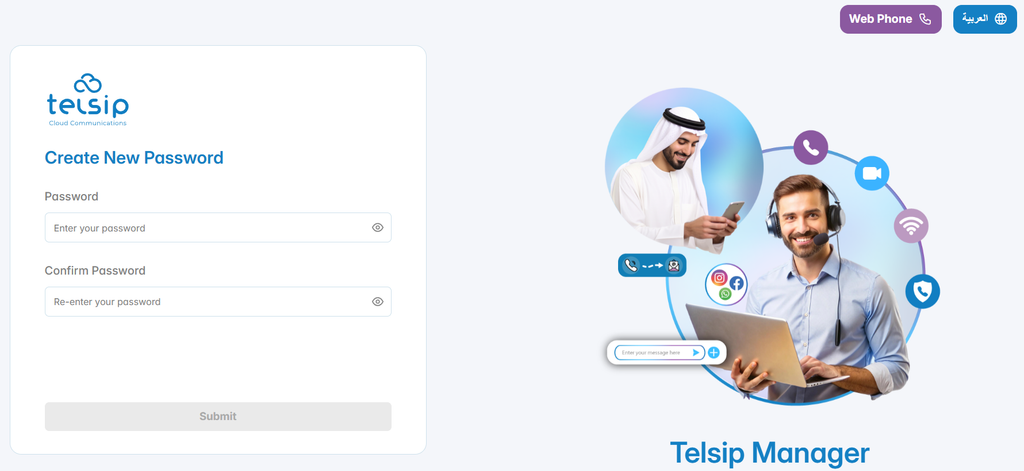
  • Enter a new secure password that meets all the following requirements:
    • Minimum of 12 characters
    • At least one lowercase letter (a–z)
    • At least one uppercase letter (A–Z)
    • At least one number (0–9)
  • Re-enter the new password in the Confirm Password field.
  • Click Submit.

5. Login with the New Password

After the password is reset successfully, return to the login page and sign in using the username and the new password.

This completes the password recovery process and restores access to the Telsip Manager PBX account.

Was this helpful?

Yes  No

Didn't find your answer? تواصل معنا

Previously
Overview
Up Next
License
©2026 XonTel Technology Co. W.L.L. – Kuwait. All rights reserved.
TELSIP is a Registered Trademark of XonTel Technologies, registered with EUIPO.