• Telsip Onboarding
    • Registering a New Company on Telsip
    • Logging in to Your Company Account
    • Subscribing to Telsip Plans
    • Payment & Activation
  • Telsip Business Portal
    • Dashboard
    • Spark Management
    • DID Numbers
    • Billing & Payments
      • Subscriptions
      • Wallet
      • Orders
      • Payment History
      • Payment Cards
    • الشركة
    • الدعم
    • Settings
    • User Profile
  • Telsip Mobile Application
    • Application Login
    • Phone
    • Calls
    • Connections
    • Voicemail
    • More Menu
      • Accounts
      • Settings
      • Change Language
      • About App
      • Call Telsip Support
      • Chat with Telsip Support
  • Telsip Platform
    • Telsip Cloud PBX
      • PBX V 1.X.X
        • Overview
          • Log in to the PBX
        • System
          • Authentication
            • Users
            • Groups
            • Permissions
          • Network
            • Network Host
            • Diagnostic Tools
          • Email
          • Security
            • IP Tables
            • Fail2ban
          • VPN
          • Maintenance
          • LDAP
        • PBX
          • Extensions
          • Trunks
          • Call controls
            • Inbound Routes
            • Outbound Routes
            • Time Conditions
            • Auto CLIP
          • Call Features
            • IVR
            • Ring Group
            • Queue
            • Paging/Intercom
            • Blacklist
          • Voice Prompts
          • Music On Hold
          • NAT
          • Status
          • CDR
          • Feature Code
          • Recording Storage
          • Transport
        • Event Center
          • Session Timeout
          • Activity Log
      • PBX V 2.X.X
        • Overview
          • Log in to the PBX
        • Dashboard
        • Extensions
        • Trunks
        • PBX Features
          • Call Features
            • IVR
            • Ring Group
            • Paging/Intercom
            • Blacklist
          • Call controls
            • Inbound Routes
            • Outbound Routes
            • Time Conditions
            • Auto CLIP
          • Feature Code
        • Voice & Audio
          • Voice Prompts
          • Music On Hold
          • System Sound Language
        • Queues
        • CDRs
        • SIP Settings
          • NAT
          • Transport
        • System
          • Network
            • Network Host
            • Diagnostic Tools
          • VPN
          • SMTP Settings
          • LDAP
          • Session Timeout
          • Storage
        • Security
          • Firewall
          • Fail2ban
        • Maintenance
          • Service Actions
          • Backup & Restore
        • Advanced Settings
        • Status
        • Audit Log
        • Authentication
          • Users
          • Groups
          • Permissions
    • Telsip Cloud Call Center
      • Call Center V 1.X.X
        • Overview
          • Log in to the call center
        • Dashboard
          • Agent Insights
          • Inbound calls
          • Outbound calls
          • My Dashboard
        • Call Center Management
          • Missed Call Actions
            • Missed Calls Actions History
            • Missed Call Actions
            • Missed Calls Actions Logs
          • Type of Break
          • Widgets
          • CDRs
          • CDR Survey Questions
          • Queues
          • Queue Logs
          • Trunk
          • External Lookup
        • Contacts Management
          • Contacts
          • Contact Groups
          • Companies
          • Contact Custom fields
          • Customer Journey
        • Authentication
          • Users
            • Admin
            • Supervisor
            • Agent
          • Groups
          • Permissions
          • Add End User
        • Applications
          • Ticket Managements
            • Create Ticket
            • Categories
              • Sub Categories
            • Reminder Settings
            • Tickets List
            • Ticket Statistics
            • Tickets CCs
            • Follow Up
            • Notifications Templates
            • Custom Fields
            • Ticket Logs
          • SMS
            • SMS Message
            • Bulk SMS
            • SMS Templates
          • Email Management
            • Outgoing Emails
            • Incoming Emails
            • Attachments
            • Templates
            • Teams
          • Auto Dialer
            • Dial Teams
            • Auto Dialer Log
            • Auto Dialer Status
          • Web Chat
            • Dashboard
            • Offline Messages
            • Web Chat Logs
          • Queue Evaluation
            • Queues Evaluation Level
            • Queues Evaluation
          • Social Media
            • Social Media Teams
            • Social Media Sessions Tracker
            • WhatsApp
          • Agent Chat
        • Reports
          • Generate Reports
        • Settings
          • Site Administration
          • Email Settings
          • Email Channel Mailbox
          • Email Channel Outbox
          • Email Logger
          • Web Chat Settings
          • SMS Gateway
          • ODBC Settings
          • System Parameters
          • Updates
          • Web Phone Configuration
          • Web Logo Settings
          • End User Logo
        • Block
          • Blocked Word
          • Block Settings
        • Status
        • Session Control
        • Activity Log
    • Versions & Releases
      • v1.x.x
        • v1.1.x
        • v1.2.x
        • v1.3.x
        • v1.4.x
        • v1.5.x
        • v1.6.x
        • v1.7.x
        • v1.8.x
        • v1.9.x
        • v1.10.x
        • v1.11x
      • v2.x.x
        • v2.0.X
          • v2.0.4
      • v3.x.x
        • v3.0.x
        • v3.1.x
        • v3.2.x
        • v3.3.x

Firewall

10 views 0

Written by Telsip WikiAdmin
يوليو 31, 2026

The Firewall section is used to manage firewall protection and access control rules for the PBX system. It allows administrators to control which IP addresses, domains, ports, and countries are allowed or restricted from accessing system services.
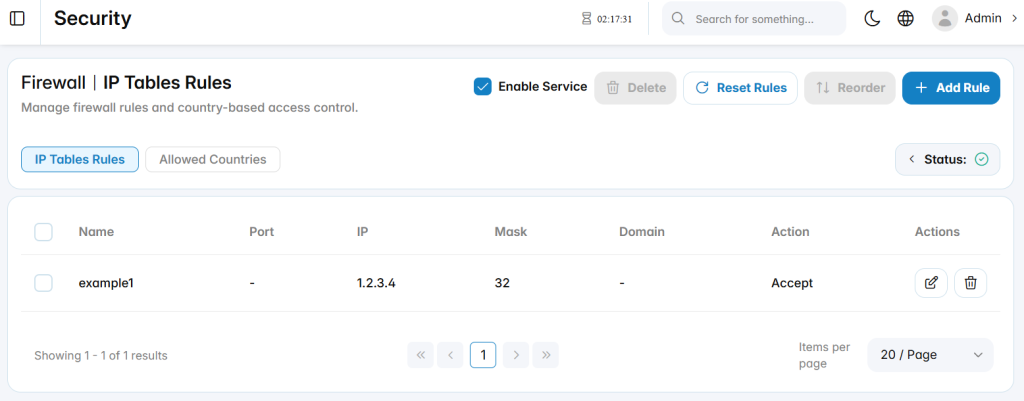
Firewall Service

Enable Service: Enables or disables the firewall service.

Status: Displays the current firewall service state.

Reset Rules: Restores firewall rules to the default configuration.

Reorder: Adjusts the order in which firewall rules are applied.

Firewall Rule Categories

The firewall configuration includes the following categories:

  • IP Tables Rules: Manages rule-based access control using IP addresses, ports, masks, domains, and actions.
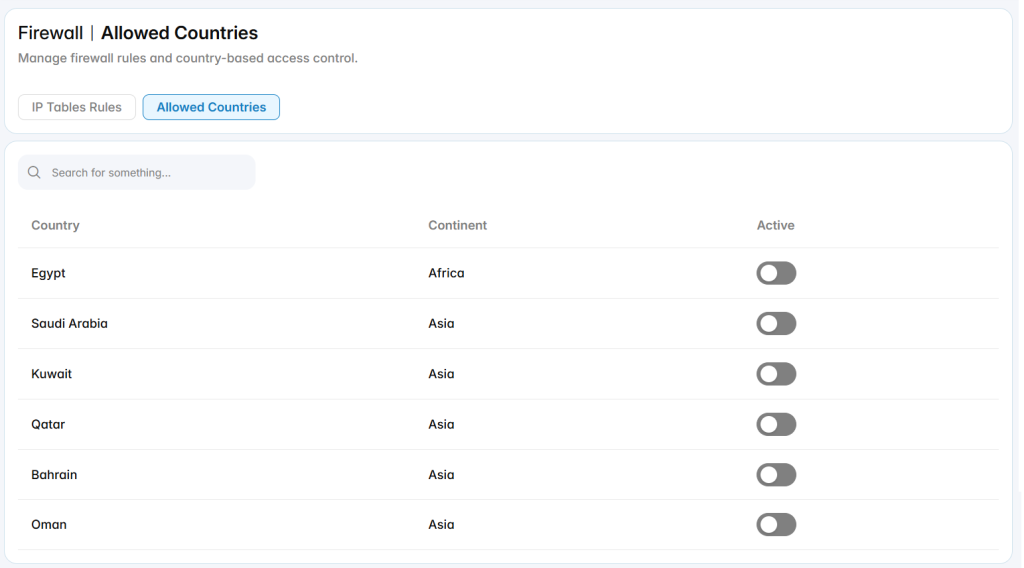
  • Allowed Countries: Manages country-based access control when geographic filtering is required.

IP Tables Rules

The IP tables rules list displays configured firewall rules and their main details.

Add Rule

The Add Rule section is used to create a new firewall rule for controlling access to PBX services.
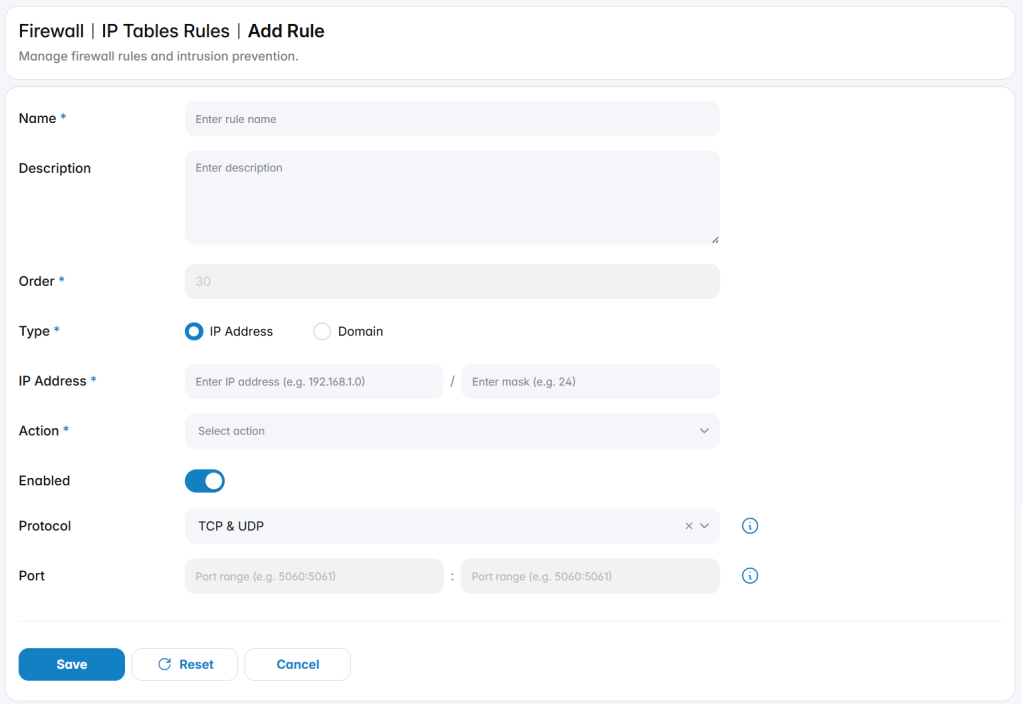
Name: Defines the name used to identify the firewall rule.

Description: Provides optional details about the purpose of the rule.

Order: Defines the rule priority. Rules are applied according to their order.

Type: Specifies whether the rule applies to an IP Address or a Domain.

IP Address: Defines the IP address and mask used to match network traffic when IP Address is selected.

Action: Defines the action applied to matching traffic, such as Accept or Reject access.

Enabled: Enables or disables the firewall rule without deleting it.

Protocol: Defines the protocol affected by the rule, such as TCP, UDP, or both.

Port: Defines the port or port range affected by the rule.

Allowed Countries

The Allowed Countries section is used to manage country-based access control for the PBX system. It allows administrators to control whether traffic from specific countries is permitted based on geographic filtering rules.
Was this helpful?

Yes  No

Didn't find your answer? تواصل معنا

Previously
Security
Up Next
Fail2ban
Copyright 2026 telsip.com All Rights Reserved