• Telsip Onboarding
    • Registering a New Company on Telsip
    • Logging in to Your Company Account
    • Subscribing to Telsip Plans
    • Payment & Activation
  • Telsip Business Portal
    • Dashboard
    • Spark Management
    • DID Numbers
    • Billing & Payments
      • Subscriptions
      • Wallet
      • Orders
      • Payment History
      • Payment Cards
    • الشركة
    • الدعم
    • Settings
    • User Profile
  • Telsip Mobile Application
    • Application Login
    • Phone
    • Calls
    • Connections
    • Voicemail
    • More Menu
      • Accounts
      • Settings
      • Change Language
      • About App
      • Call Telsip Support
      • Chat with Telsip Support
  • Telsip Platform
    • Telsip Cloud PBX
      • PBX V 1.X.X
        • Overview
          • Log in to the PBX
        • System
          • Authentication
            • Users
            • Groups
            • Permissions
          • Network
            • Network Host
            • Diagnostic Tools
          • Email
          • Security
            • IP Tables
            • Fail2ban
          • VPN
          • Maintenance
          • LDAP
        • PBX
          • Extensions
          • Trunks
          • Call controls
            • Inbound Routes
            • Outbound Routes
            • Time Conditions
            • Auto CLIP
          • Call Features
            • IVR
            • Ring Group
            • Queue
            • Paging/Intercom
            • Blacklist
          • Voice Prompts
          • Music On Hold
          • NAT
          • Status
          • CDR
          • Feature Code
          • Recording Storage
          • Transport
        • Event Center
          • Session Timeout
          • Activity Log
      • PBX V 2.X.X
        • Overview
        • Transitional Version
          • Old Design
          • New Design
      • PBX V 3.X.X
        • Overview
          • Log in to the PBX
          • License
        • Dashboard
        • Extensions
          • Extension Logs
        • Trunks
        • Queues
        • PBX Features
          • Call Features
            • IVR
            • Ring Group
            • Paging/Intercom
            • Blacklist
          • Call controls
            • Inbound Routes
            • Outbound Routes
            • Time Conditions
            • Auto CLIP
          • Feature Code
        • Voice & Audio
          • Voice Prompts
          • Music On Hold
          • System Sound Language
        • SIP Settings
          • NAT
          • Transport
          • Media Transport Settings
        • System
          • Network
            • Network Routes
            • Network Host
            • Diagnostic Tools
          • VPN
          • SMTP Settings
          • LDAP
          • Session Timeout
          • Storage
        • Security
          • Firewall
          • Fail2ban
        • Maintenance
          • Service Actions
          • Backup & Restore
        • Authentication
          • Users
          • Groups
          • Permissions
        • Advanced Settings
        • CDRs
        • Status
        • Audit Log
    • Telsip Cloud Call Center
      • Call Center V 1.X.X
        • Overview
          • Log in to the call center
        • Dashboard
          • Agent Insights
          • Inbound calls
          • Outbound calls
          • My Dashboard
        • Call Center Management
          • Missed Call Actions
            • Missed Calls Actions History
            • Missed Call Actions
            • Missed Calls Actions Logs
          • Type of Break
          • Widgets
          • CDRs
          • CDR Survey Questions
          • Queues
          • Queue Logs
          • Trunk
          • External Lookup
        • Contacts Management
          • Contacts
          • Contact Groups
          • Companies
          • Contact Custom fields
          • Customer Journey
        • Authentication
          • Users
            • Admin
            • Supervisor
            • Agent
          • Groups
          • Permissions
          • Add End User
        • Applications
          • Ticket Managements
            • Create Ticket
            • Categories
              • Sub Categories
            • Reminder Settings
            • Tickets List
            • Ticket Statistics
            • Tickets CCs
            • Follow Up
            • Notifications Templates
            • Custom Fields
            • Ticket Logs
          • SMS
            • SMS Message
            • Bulk SMS
            • SMS Templates
          • Email Management
            • Outgoing Emails
            • Incoming Emails
            • Attachments
            • Templates
            • Teams
          • Auto Dialer
            • Dial Teams
            • Auto Dialer Log
            • Auto Dialer Status
          • Web Chat
            • Dashboard
            • Offline Messages
            • Web Chat Logs
          • Queue Evaluation
            • Queues Evaluation Level
            • Queues Evaluation
          • Social Media
            • Social Media Teams
            • Social Media Sessions Tracker
            • WhatsApp
          • Agent Chat
        • Reports
          • Generate Reports
        • Settings
          • Site Administration
          • Email Settings
          • Email Channel Mailbox
          • Email Channel Outbox
          • Email Logger
          • Web Chat Settings
          • SMS Gateway
          • ODBC Settings
          • System Parameters
          • Updates
          • Web Phone Configuration
          • Web Logo Settings
          • End User Logo
        • Block
          • Blocked Word
          • Block Settings
        • Status
        • Session Control
        • Activity Log
      • Call Center V 2.X.X
        • Overview
        • Transitional Version
          • Old Design
          • New Design
      • Call Center V 3.X.X
        • Overview
          • Login to Call Center
          • License
        • Dashboard
          • Inbound Calls Dashboard
          • Outbound Calls Dashboard
          • My Dashboard
          • Agent Analytics Dashboard
        • Call Center Tools
          • Agent Status Logs
          • Call Tags
          • Missed Call Management
          • Custom Widgets
          • Type Of Break
          • External Lookup
        • Contacts
          • Contacts Dashboard
          • All Contacts
          • Contact Groups
          • Contact Tags
          • Companies
          • Custom Fields
          • Customer Journey
        • Applications
          • Tickets
            • Dashboard
            • All Tickets
            • Categories
              • Subcategories
            • Ticket CC
            • Reminder Settings
            • Ticket Follow Up
            • Ticket Custom Fields
            • Notification Templates
            • Ticket Log
          • SMS
            • Dashboard
            • SMS Messages
            • Bulk SMS
            • SMS Templates
            • SMS Settings
          • قنوات البريد الإلكتروني
            • Dashboard
            • Outgoing Emails
            • Incoming Emails
            • Attachments
            • Email Templates
            • Teams
            • Mailbox Settings
            • Outbox Settings
          • Web Chat
            • Dashboard
            • Offline Messages
            • Web Chat Logs
            • Web Chat Settings
          • Block
            • Blocked Words
            • Block Settings
            • Block List
          • Auto Dialer
            • Auto Dialer
            • Dial Teams
            • Auto Dialer Log
            • Auto Dialer Status
          • Queue Evaluation
            • Evaluation Level
            • Queue Evaluation
          • Agent Chat
        • Settings
          • Site Administration
          • Email Settings
          • Email Logger
          • ODBC Settings
          • System Parameters
          • Web Logo Settings
          • End User Logo
        • Authentication
          • Users
            • Agent
            • Supervisor
          • End User
        • Live Status
        • Reports
        • Session Control
    • Versions & Releases
      • v1.x.x
        • v1.1.x
        • v1.2.x
        • v1.3.x
        • v1.4.x
        • v1.5.x
        • v1.6.x
        • v1.7.x
        • v1.8.x
        • v1.9.x
        • v1.10.x
        • v1.11x
      • v2.x.x
        • v2.0.X
          • v2.0.4
      • v3.x.x
        • v3.0.x
        • v3.1.x
        • v3.2.x
        • v3.3.x
  • Telsip Omnichannel Platform
    • Omni V 1.X.X
      • Overview
        • Admin Portal & Agent Workspace
        • Log in to Telsip Omnichannel Platform
        • License
      • Admin Portal
        • Dashboard
        • Inboxes
        • Conversations
        • Users
        • Groups
          • Permissions
        • Teams
        • Contacts
          • Tags
          • Imports
          • Exports
        • Social
          • Social Interactive Templates
        • WhatsApp
          • Catalogs

Social Interactive Templates

1 views 0

Written by Telsip WikiAdmin
نوفمبر 21, 2026

Social Interactive Templates are ready-made rich messages for Messenger and Instagram, such as product cards with images and buttons, button menus, quick replies, coupons, and feedback surveys. You create a template once and reuse it in conversations instead of building the message every time.

  • Before you start:
    • Connect a Messenger or Instagram channel from the Channels page.
  • View templates:
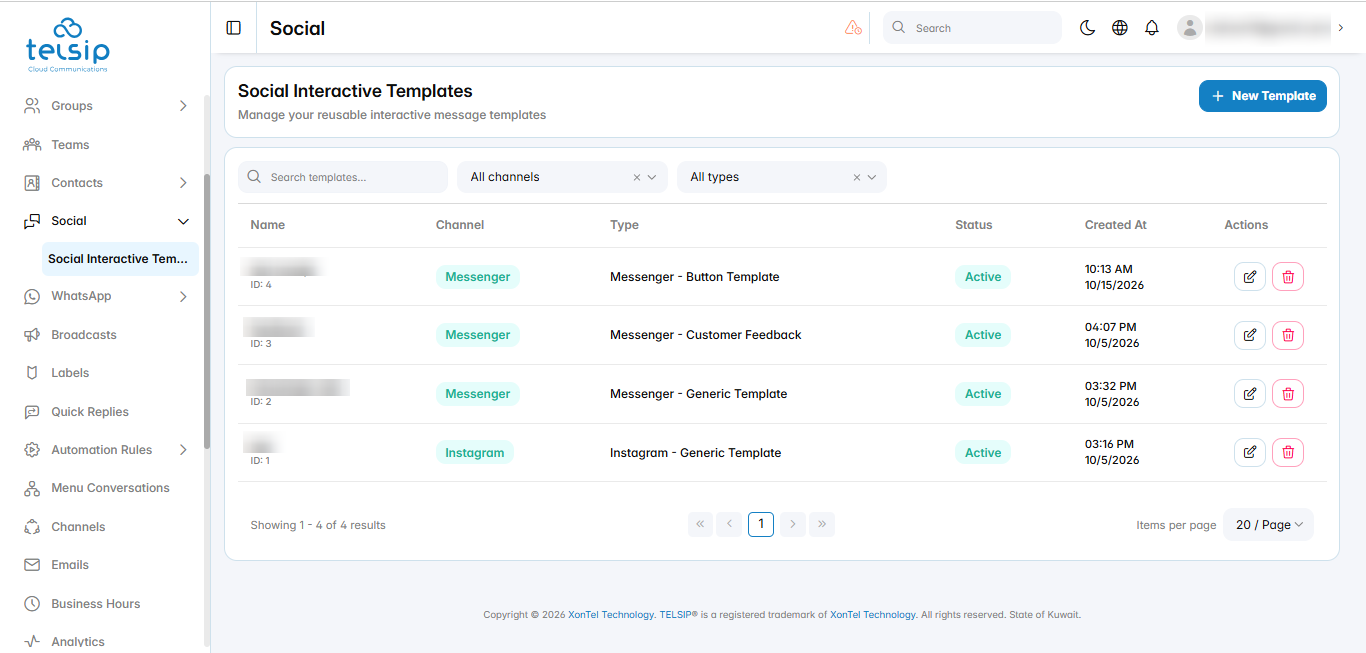
    • Click Social from the sidebar menu, then click Social Interactive Templates.
    • Search for a template by name, or filter the list by channel (Messenger or Instagram) and by type.
    • The table shows each template’s name, channel, type, status, and creation date. Use the icons in the Actions column to edit or delete a template.
  • Create a template:
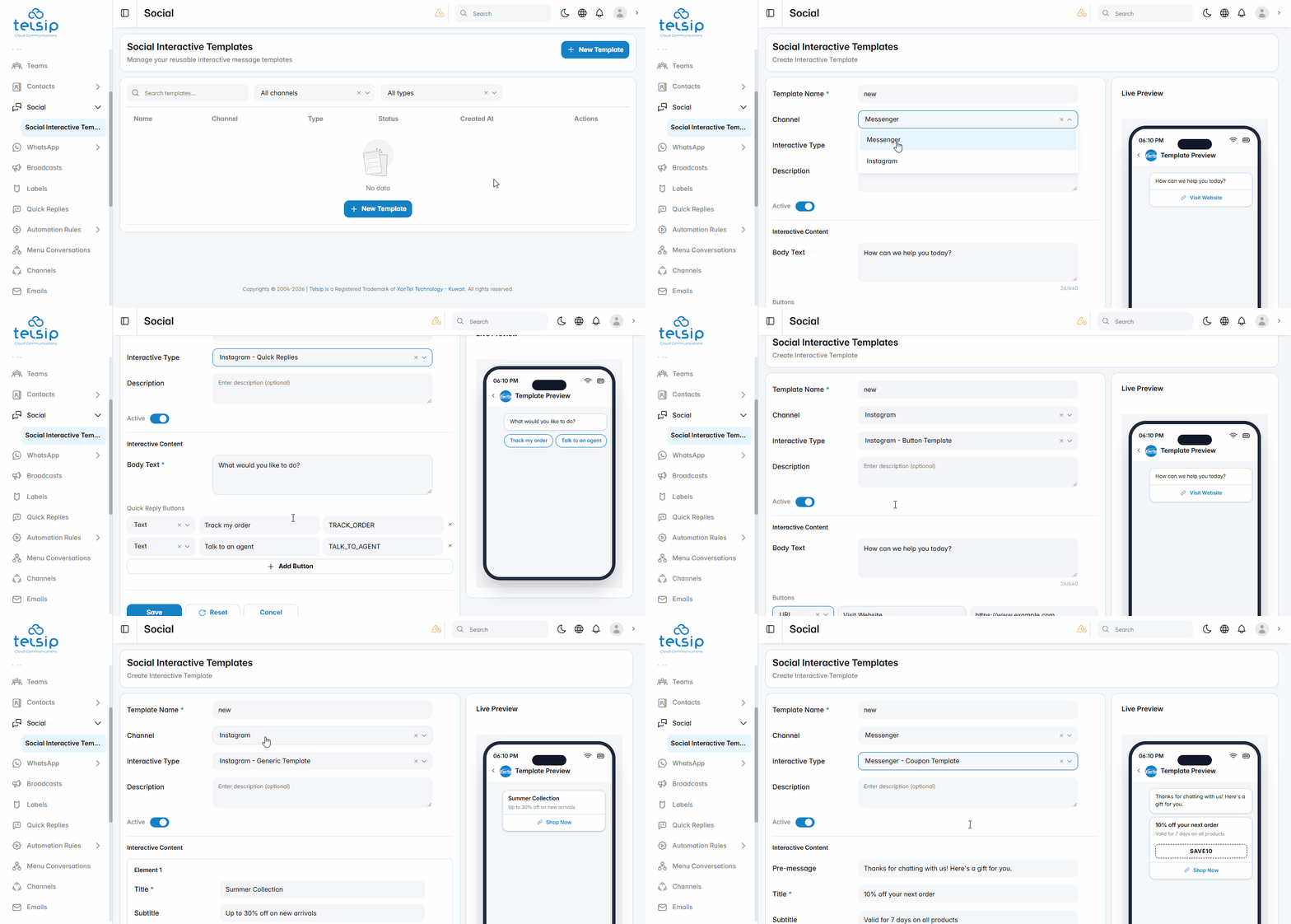
    • Click New Template.
    • Template Name: a name for the template, for example “Summer Offers”.
    • Channel: choose Instagram or Messenger. The available template types change based on the channel you choose.
    • Interactive Type: choose the type of message:
      • Instagram: Generic Template, Button Template, or Quick Replies.
      • Messenger: Button Template, Generic Template, Image Grid, Coupon Template, or Customer Feedback.
    • Description: an optional internal note about the template.
    • Active: keep it turned on to use the template.
    • Fill in the Interactive Content for the type you chose. The Live Preview on the right shows how the message will look.
    • Click Save to create the template.
  • Template types:
    • Generic Template: one or more cards that customers can scroll through. Each card has a title, an optional subtitle and image, a link that opens when the card is tapped, and up to three buttons. Click Add Element to add another card.
    • Button Template: a text message with up to three buttons.
    • Quick Replies (Instagram): a message with reply options that customers tap to answer quickly.
    • Image Grid (Messenger): a group of images, with an optional title, subtitle, and buttons.
    • Coupon Template (Messenger): a discount offer with a coupon code or a coupon link.
    • Customer Feedback (Messenger): a short survey that asks customers to rate their experience.
  • Buttons:
    • URL: opens a web page. Enter the button text and the link.
    • Postback: sends a value back to the conversation when the customer taps the button. Enter the button text and the value to send.
  • Edit or delete a template:
    • Click the edit icon next to a template to change it, then click Save.
    • Click the delete icon next to a template to delete it, then confirm.

📌 Note: For WhatsApp, use Interactive Templates from the WhatsApp section instead.

Was this helpful?

Yes  No

Didn't find your answer? تواصل معنا

Previously
Social
Up Next
WhatsApp
©2026 XonTel Technology Co. W.L.L. – Kuwait. All rights reserved.
TELSIP is a Registered Trademark of XonTel Technologies, registered with EUIPO.