
The Live Dashboard provides a real-time overview of Call Center performance and current operational activities. It enables users to monitor live call statistics, agent availability, queue performance, and recent call activities through a centralized dashboard.
The Live Dashboard helps supervisors quickly understand the current contact center status, identify workload changes, and monitor service performance in real time.
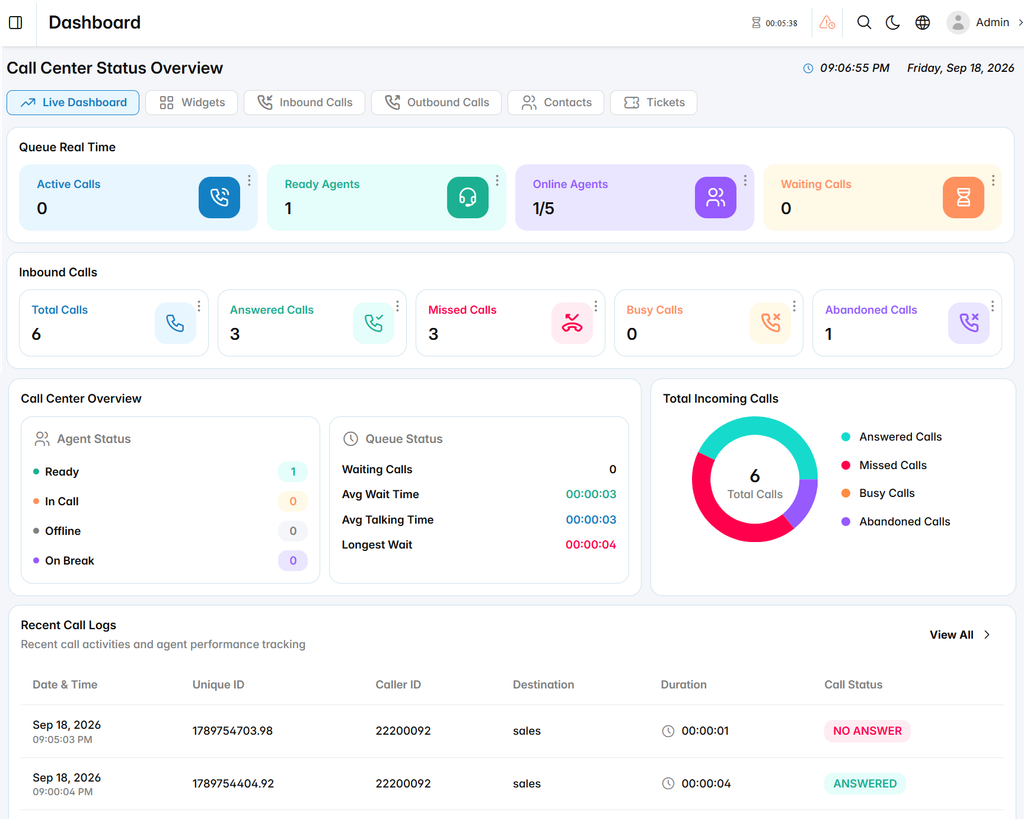
Queue Real Time
The Queue Real Time section displays the current status of queue operations, including:
- Active Calls: Displays the number of calls currently being handled by agents.
- Ready Agents: Shows the number of agents currently available to receive calls.
- Online Agents: Displays the number of connected agents compared to the total number of agents.
- Waiting Calls: Shows the number of customer calls currently waiting in queues.
Inbound Calls
The Inbound Calls section provides a real-time summary of incoming call activities, including:
- Total Calls: Displays the total number of received incoming calls.
- Answered Calls: Shows the number of calls successfully answered by agents.
- Missed Calls: Displays calls that were not answered.
- Busy Calls: Shows calls rejected due to busy agent status.
- Abandoned Calls: Displays calls disconnected by customers before being answered.
Call Center Overview
The Call Center Overview provides a quick view of agent and queue performance.
Agent Status
- Ready: Displays agents available to handle calls.
- In Call: Shows agents currently handling active calls.
- Offline: Displays agents who are not connected.
- On Break: Shows agents currently unavailable due to break status.
Queue Status
- Waiting Calls: Displays the number of calls waiting in queues.
- Avg Wait Time: Shows the average customer waiting time before answering.
- Avg Talking Time: Displays the average duration of handled calls.
- Longest Wait: Shows the longest waiting time for customers in the queue.
Total Incoming Calls
The Total Incoming Calls chart provides a visual representation of call results, showing the distribution between answered, missed, busy, and abandoned calls.
Recent Call Logs
The Recent Call Logs section displays the latest call activities for monitoring and tracking purposes.
Date & Time: Displays when the call occurred.
Unique ID: Shows the unique identifier assigned to the call.
Caller ID: Displays the caller’s number or identifier.
Destination: Shows the queue or destination that received the call.
Duration: Displays the call duration.
Call Status: Shows the final result of the call, such as answered or no answer.