• Categories
    • Sub Categories
  • Offline Messages
  • Web Chat Logs
  • Auto Dialer Log
  • Auto Dialer Status
  • Dashboard
  • SMS Message
  • Bulk SMS
  • SMS Templates
  • Outgoing Emails
  • Incoming Emails
  • Attachments
  • Templates
  • Teams
  • WhatsApp
  • Dial Teams
  • Social Media Teams
  • Social Media Sessions Tracker
  • Queues Evaluation Level
  • Create Ticket
  • Telsip Onboarding
    • Registering a New Company on Telsip
    • Logging in to Your Company Account
    • Subscribing to Telsip Plans
    • Payment & Activation
  • Tickets List
  • Telsip Business Portal
    • Dashboard
    • Spark Management
    • DID Numbers
    • Billing & Payments
      • Subscriptions
      • Wallet
      • Orders
      • Payment History
      • Payment Cards
    • Company
    • Support
    • Settings
    • User Profile
  • Telsip Mobile Application
    • Application Login
    • Phone
    • Calls
    • Connections
    • Voicemail
    • More Menu
      • Accounts
      • Settings
      • Change Language
      • About App
      • Call Telsip Support
      • Chat with Telsip Support
  • Reminder Settings
  • Telsip Platform
    • Telsip Cloud PBX
      • PBX V 1.X.X
        • Overview
          • Log in to the PBX
        • System
          • Authentication
            • Users
            • Groups
            • Permissions
          • Network
            • Network Host
            • Diagnostic Tools
          • Email
          • Security
            • IP Tables
            • Fail2ban
          • VPN
          • Maintenance
          • LDAP
        • PBX
          • Extensions
          • Trunks
          • Call controls
            • Inbound Routes
            • Outbound Routes
            • Time Conditions
            • Auto CLIP
          • Call Features
            • IVR
            • Ring Group
            • Queue
            • Paging/Intercom
            • Blacklist
          • Voice Prompts
          • Music On Hold
          • NAT
          • Status
          • CDR
          • Feature Code
          • Recording Storage
          • Transport
        • Event Center
          • Session Timeout
          • Activity Log
      • PBX V 2.X.X
        • Overview
        • Transitional Version
          • Old Design
          • New Design
      • PBX V 3.X.X
        • Overview
          • Log in to the PBX
          • License
        • Dashboard
        • Extensions
          • Extension Logs
        • Trunks
        • Queues
        • PBX Features
          • Call Features
            • IVR
            • Ring Group
            • Paging/Intercom
            • Blacklist
          • Call controls
            • Inbound Routes
            • Outbound Routes
            • Time Conditions
            • Auto CLIP
          • Feature Code
        • Voice & Audio
          • Voice Prompts
          • Music On Hold
          • System Sound Language
        • SIP Settings
          • NAT
          • Transport
          • Media Transport Settings
        • System
          • Network
            • Network Routes
            • Network Host
            • Diagnostic Tools
          • VPN
          • SMTP Settings
          • LDAP
          • Session Timeout
          • Storage
        • Security
          • Firewall
          • Fail2ban
        • Maintenance
          • Service Actions
          • Backup & Restore
        • Authentication
          • Users
          • Groups
          • Permissions
        • Advanced Settings
        • CDRs
        • Status
        • Audit Log
    • Telsip Cloud Call Center
      • Call Center V 1.X.X
        • Overview
          • Log in to the call center
        • Dashboard
          • Agent Insights
          • Inbound calls
          • Outbound calls
          • My Dashboard
        • Call Center Management
          • Missed Call Actions
            • Missed Calls Actions History
            • Missed Call Actions
            • Missed Calls Actions Logs
          • Type of Break
          • Widgets
          • CDRs
          • CDR Survey Questions
          • Queues
          • Queue Logs
          • Trunk
          • External Lookup
        • Contacts Management
          • Contacts
          • Contact Groups
          • Companies
          • Contact Custom fields
          • Customer Journey
        • Authentication
          • Users
            • Admin
            • Supervisor
            • Agent
          • Groups
          • Permissions
          • Add End User
        • Applications
          • Ticket Managements
            • Create Ticket
            • Categories
              • Sub Categories
            • Reminder Settings
            • Tickets List
            • Ticket Statistics
            • Tickets CCs
            • Follow Up
            • Notifications Templates
            • Custom Fields
            • Ticket Logs
          • SMS
            • SMS Message
            • Bulk SMS
            • SMS Templates
          • Email Management
            • Outgoing Emails
            • Incoming Emails
            • Attachments
            • Templates
            • Teams
          • Auto Dialer
            • Dial Teams
            • Auto Dialer Log
            • Auto Dialer Status
          • Web Chat
            • Dashboard
            • Offline Messages
            • Web Chat Logs
          • Queue Evaluation
            • Queues Evaluation Level
            • Queues Evaluation
          • Social Media
            • Social Media Teams
            • Social Media Sessions Tracker
            • WhatsApp
          • Agent Chat
        • Reports
          • Generate Reports
        • Settings
          • Site Administration
          • Email Settings
          • Email Channel Mailbox
          • Email Channel Outbox
          • Email Logger
          • Web Chat Settings
          • SMS Gateway
          • ODBC Settings
          • System Parameters
          • Updates
          • Web Phone Configuration
          • Web Logo Settings
          • End User Logo
        • Block
          • Blocked Word
          • Block Settings
        • Status
        • Session Control
        • Activity Log
      • Call Center V 2.X.X
        • Overview
        • Transitional Version
          • Old Design
          • New Design
      • Call Center V 3.X.X
        • Overview
          • Login to Call Center
          • License
        • Dashboard
          • Inbound Calls Dashboard
          • Outbound Calls Dashboard
          • My Dashboard
          • Agent Analytics Dashboard
        • Call Center Tools
          • Agent Status Logs
          • Call Tags
          • Missed Call Management
          • Custom Widgets
          • Type Of Break
          • External Lookup
        • Contacts
          • Contacts Dashboard
          • All Contacts
          • Contact Groups
          • Contact Tags
          • Companies
          • Custom Fields
          • Customer Journey
        • Applications
          • Tickets
            • Dashboard
            • All Tickets
            • Categories
              • Subcategories
            • Ticket CC
            • Reminder Settings
            • Ticket Follow Up
            • Ticket Custom Fields
            • Notification Templates
            • Ticket Log
          • SMS
            • Dashboard
            • SMS Messages
            • Bulk SMS
            • SMS Templates
            • SMS Settings
          • Email Channel
            • Dashboard
            • Outgoing Emails
            • Incoming Emails
            • Attachments
            • Email Templates
            • Teams
            • Mailbox Settings
            • Outbox Settings
          • Web Chat
            • Dashboard
            • Offline Messages
            • Web Chat Logs
            • Web Chat Settings
          • Block
            • Blocked Words
            • Block Settings
            • Block List
          • Auto Dialer
            • Auto Dialer
            • Dial Teams
            • Auto Dialer Log
            • Auto Dialer Status
          • Queue Evaluation
            • Evaluation Level
            • Queue Evaluation
          • Agent Chat
        • Settings
          • Site Administration
          • Email Settings
          • Email Logger
          • ODBC Settings
          • System Parameters
          • Web Logo Settings
          • End User Logo
        • Authentication
          • Users
            • Agent
            • Supervisor
          • End User
        • Live Status
        • Reports
        • Session Control
    • Versions & Releases
      • v1.x.x
        • v1.1.x
        • v1.2.x
        • v1.3.x
        • v1.4.x
        • v1.5.x
        • v1.6.x
        • v1.7.x
        • v1.8.x
        • v1.9.x
        • v1.10.x
        • v1.11x
      • v2.x.x
        • v2.0.X
          • v2.0.4
      • v3.x.x
        • v3.0.x
        • v3.1.x
        • v3.2.x
        • v3.3.x
  • Dashboards
  • Ticket Statistics
  • Tickets CCs
  • Follow Up
  • Custom Fields
  • Notifications Templates
  • Queues Evaluation
  • Ticket Logs

Log in to the call center

149 views 0

Written by Telsip WikiAdmin
October 26, 2025

Login Portal Overview

This is the main gateway for accessing your organization’s PBX Admin system and Call Center environment. It offers a clear, user-friendly starting point for different user roles to securely reach the tools they need.

Step 1:
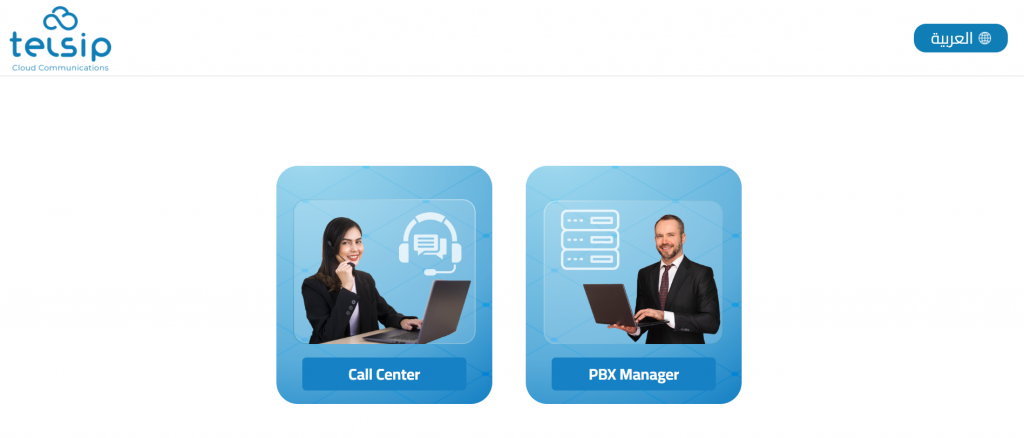
Click Call Center to move to the Call Center login page

Step 2:
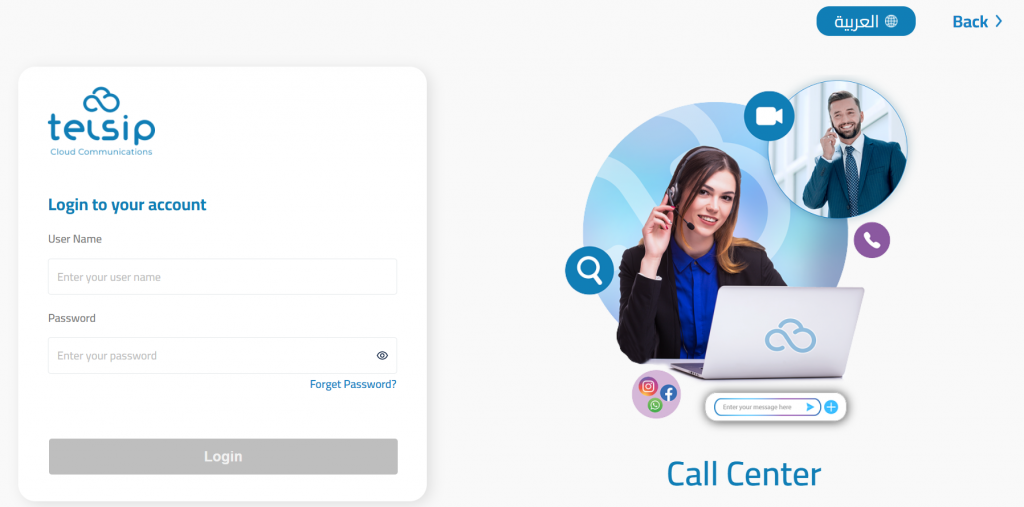
Enter your Username and Password in the provided fields.

Step 3:

Click the Login button to enter the Call Center Agent interface. From here, you can handle calls, view tickets, and communicate with customers efficiently.

Language Option

A convenient language switcher is available at the top right, allowing you to choose English or another supported language for a comfortable user experience.

User Menu Overview
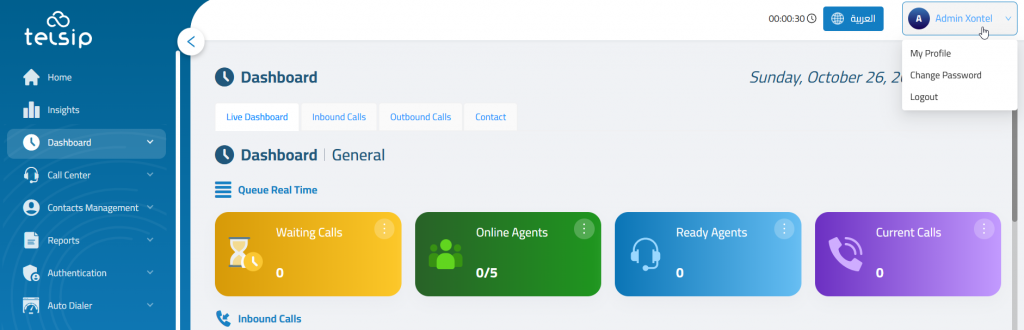
The User Menu is your personal control panel. From here, you can manage your profile, change your password, or securely log out of the system.

Editing Your Profile

Personal info
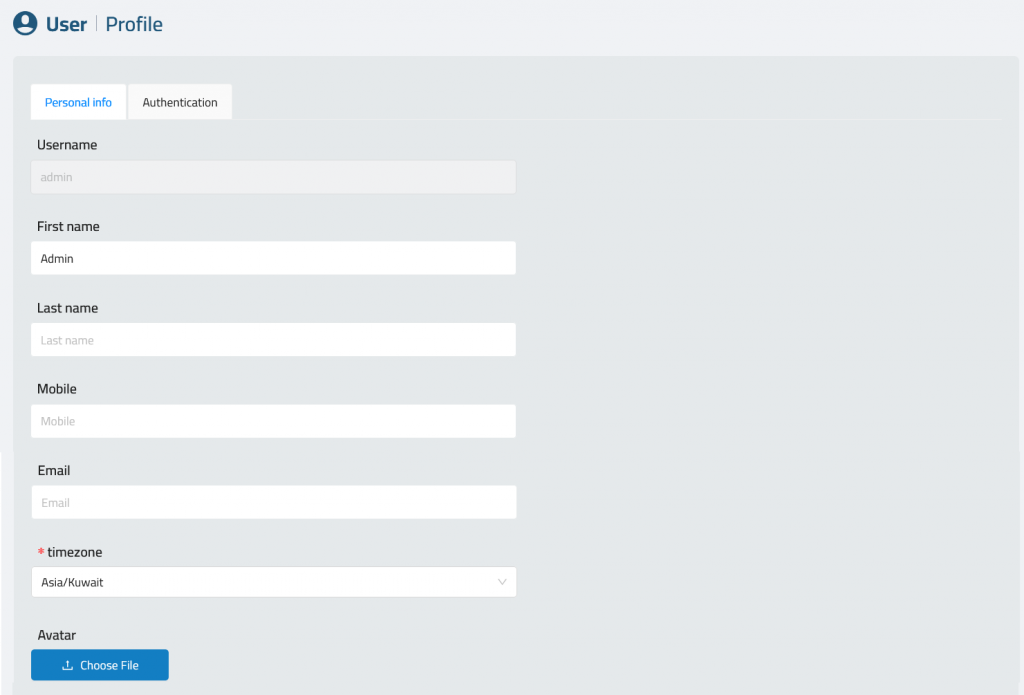
Inside Personal Info, you can update the following fields:

  • User Name – This is fixed and cannot be changed (usually set by your system admin).
  • First Name – Optional.
  • Last Name – Optional.
  • Mobile – Optional contact number.
  • Email: Add your Email.
  • Timezone: Select your timezone
  • Upload or change your Avatar image by clicking Choose File.

Authentication
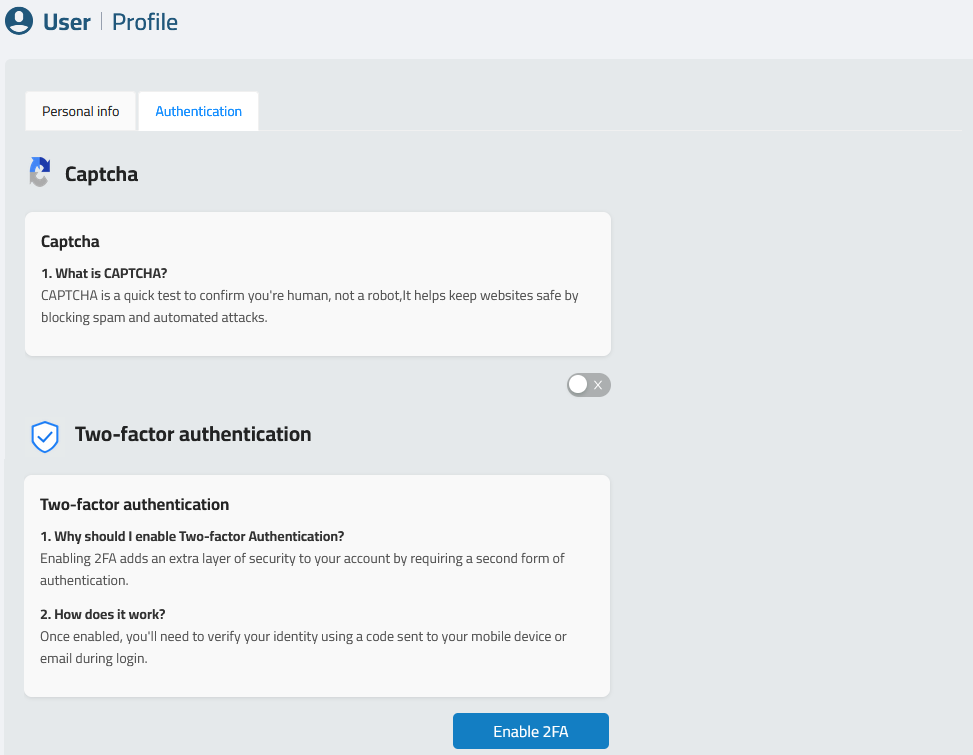
Each user can enhance their account security directly from their profile:

✅ CAPTCHA
  • Prevents automated bots from attempting unauthorized access.
  • Toggle the switch to activate CAPTCHA for login.

During login:
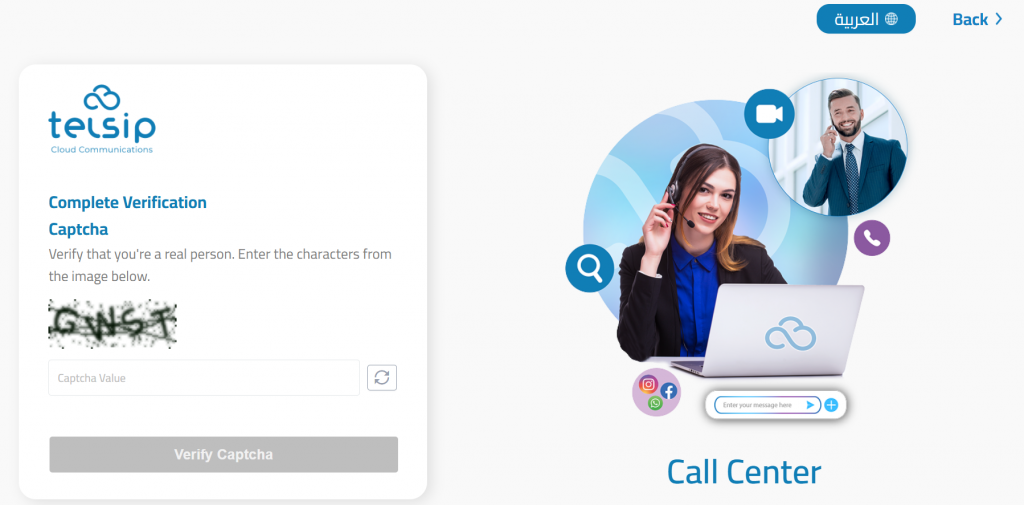
After entering your username and password, complete the CAPTCHA verification to confirm you are a valid user. Enter the characters exactly as shown in the image and click “Verify Captcha”.

✅ Two-Factor Authentication (2FA)
  • Adds an extra layer of protection by requiring a second verification step.
  • Click Enable 2FA to start setup using an authenticator app.
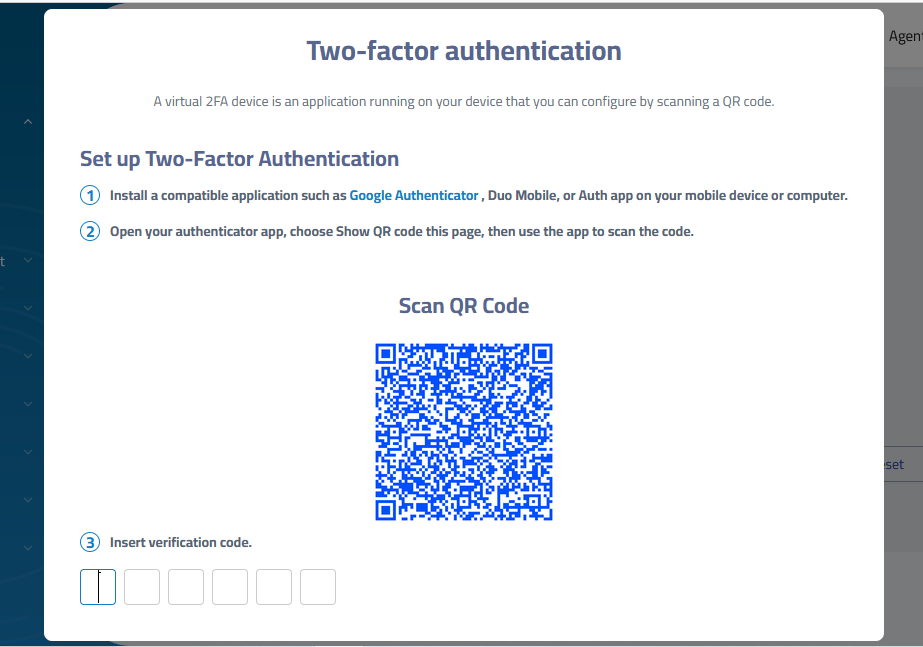
During login:
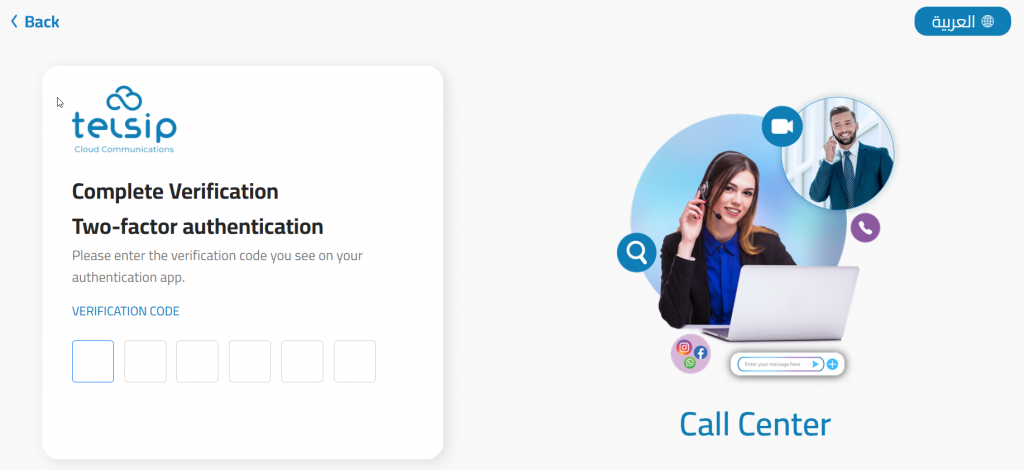
After entering your username and password, complete the CAPTCHA verification. If CAPTCHA is enabled (by user or admin), users are prompted to enter a 6-digit verification code from their authentication app (e.g., Google Authenticator or Microsoft Authenticator).

Note: Admins may enforce 2FA or CAPTCHA for specific roles from the admin panel.

Changing Password
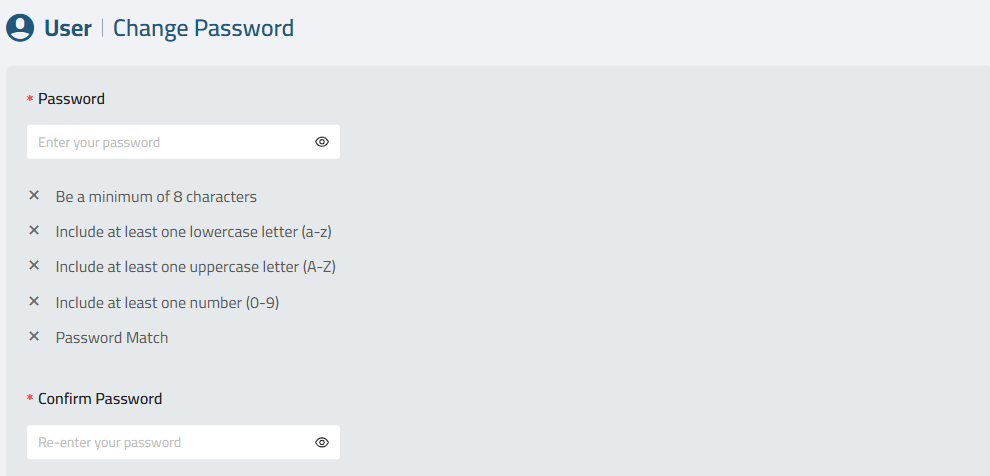
To keep your account secure, follow the password policy when creating a new password:

  • Enter your New Password, ensuring it meets the security requirements:
    • Minimum of 8 characters.
    • At least one lowercase letter.
    • At least one uppercase letter.
    • At least one number.
    • The new password and confirmation must match.
  • Confirm the new password in the Confirm Password field.
  • Submit the change.

Forget Password

Forgetting a password can happen to anyone. To ensure minimal disruption, XonTel’s Call Center platform provides a secure and straightforward password reset process.

Step 1: Navigate to the “Forget Password” Page
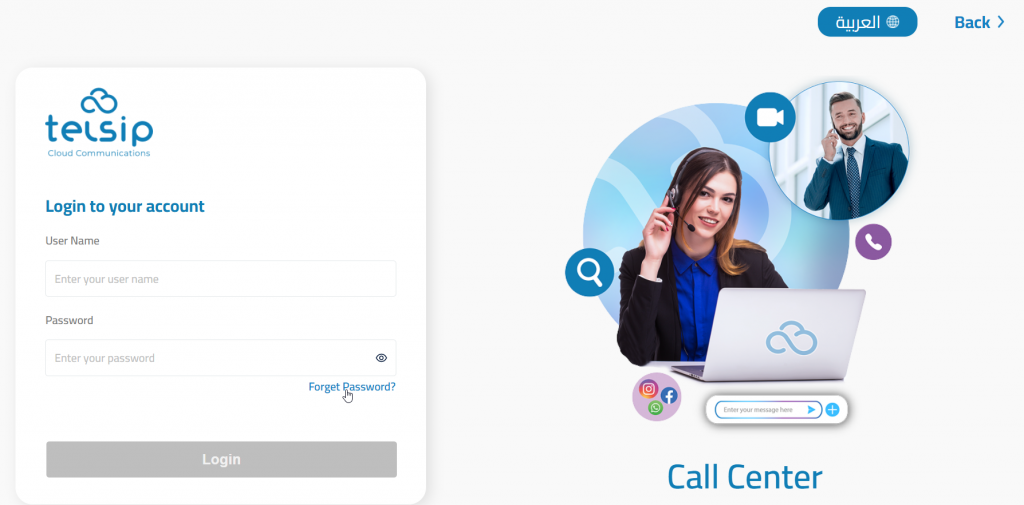
  • On the login screen, click the “Forget Password?” link.
  • You will be redirected to the Forget Password (Call Center) page.
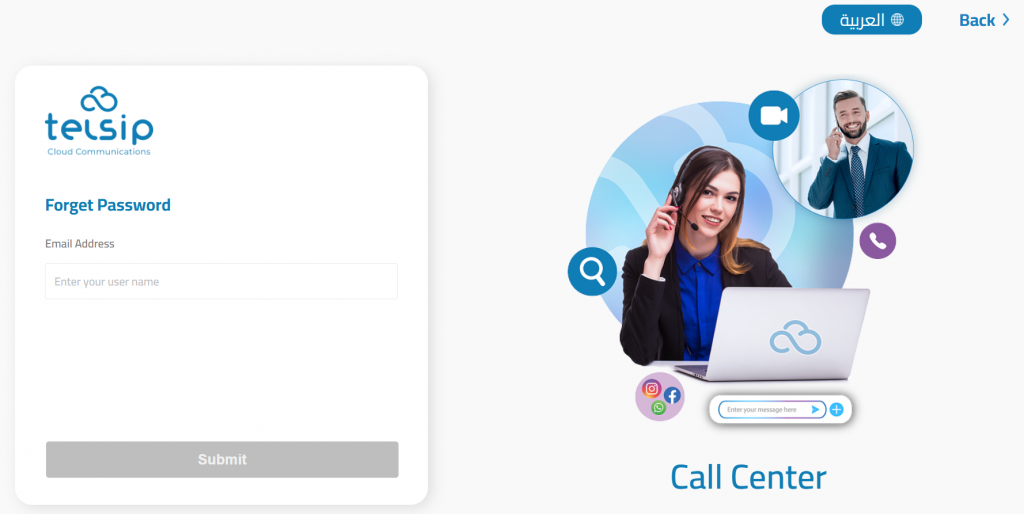
  • Enter your registered email address in the input field.
  • Click the “Submit” button.

Step 2: Check Your Email
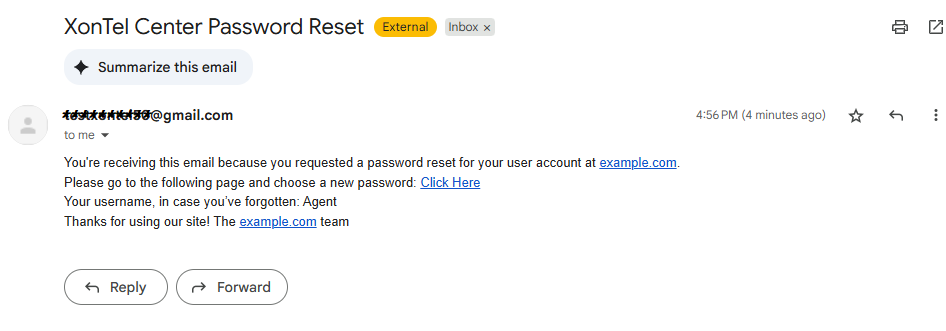
  • You will receive an email titled “XonTel Center Password Reset” from the system.
  • The email includes:
    • A password reset link (Click Here)
    • Your username (in case you forgot it)

Note: If the email doesn’t appear in your inbox, check your spam/junk folder.

Step 3: Set a New Password

Click the reset link from the email. You will be redirected to the Confirm Password page.
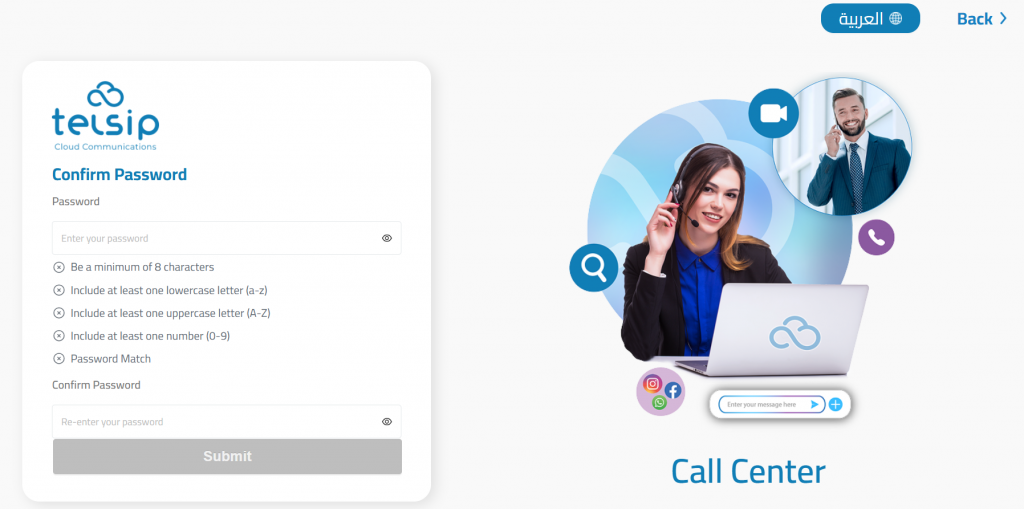
  • Enter a new secure password that meets all the following requirements:
    • Minimum of 8 characters
    • At least one lowercase letter (a–z)
    • At least one uppercase letter (A–Z)
    • At least one number (0–9)
  • Re-enter the new password in the Confirm Password field.
  • Click Submit.

Was this helpful?

Yes  No

Didn't find your answer? Contact Us

Previously
Overview
Up Next
Dashboard
©2026 XonTel Technology Co. W.L.L. – Kuwait. All rights reserved.
TELSIP is a Registered Trademark of XonTel Technologies, registered with EUIPO.